
Changing the color of your kitchen cabinets can completely transform the look and feel of your entire kitchen. But what if you’re not ready to paint yet, or you’re unsure about which color will really work in your space? Maybe you want to avoid costly mistakes, or you’re just curious to see how a new shade could brighten your room.
If you’ve ever wished you could “see” your kitchen cabinets in a different color before making a commitment, you’re not alone. Today, thanks to technology and some creative techniques, you have more options than ever to visualize your kitchen cabinets in new shades—whether you want to experiment with bold colors, classic neutrals, or something in between.
This guide will walk you through practical ways to preview new colors for your kitchen cabinets. You’ll learn about digital tools, real-life tricks, and some surprising insights homeowners often overlook. Whether you’re tech-savvy or prefer hands-on methods, you’ll find techniques that suit your style and help you make a confident decision.
Why Visualizing Cabinet Colors Matters
Before you start, it’s important to understand why testing different colors is more than just a fun exercise. Changing your cabinet color is a major design move. Cabinets take up a lot of visual space in the kitchen—sometimes up to 40% of the room’s surfaces. The color you choose will impact how large or small the space feels, how much light bounces around, and even your mood when you’re cooking or gathering with family.
Color psychology plays a role, too. For example, blues and greens can feel calming, while reds and yellows often energize. White can make a kitchen feel clean and open, but it might also show dirt more easily. Dark colors can be dramatic but could make small kitchens feel even tighter. Because cabinets are a big investment—either in time, money, or both—seeing your options ahead of time helps you avoid regrets.
Using Online Visualization Tools
Modern technology has made it much easier to preview kitchen cabinet colors. There are several online tools and apps designed to help you “paint” your cabinets virtually.
Popular Cabinet Visualizer Tools
Many paint brands and home improvement retailers offer free online visualizers. Here are a few you can try:
- Sherwin-Williams ColorSnap Visualizer lets you upload a photo of your kitchen or use sample images to try different colors on cabinets and walls.
- Benjamin Moore Personal Color Viewer allows you to “paint” cabinets in sample kitchen layouts or your own photo.
- Home Depot’s Project Color App helps you scan colors, try them on cabinets virtually, and see how they look with other elements.
How To Use A Visualizer Effectively
To get the best results, follow these steps:
- Take a clear, well-lit photo of your kitchen, preferably during the day when natural light is strongest.
- Upload the photo to the tool and select the area of the cabinets.
- Try several colors, not just your first choice. Sometimes a shade looks different on-screen than in real life.
- Adjust the brightness to mimic the lighting in your kitchen. Some visualizers let you control this.
- Save your favorite versions to compare later.
Non-obvious insight: Most people test only one or two colors. Try at least five shades, including lighter and darker versions of your favorite, to catch surprises.
Limitations Of Online Tools
While these apps are helpful, remember that screen colors can look different from real paint. Your monitor’s settings, room lighting, and even your phone’s display can change how a color appears. So, use these tools as a guide, but don’t rely on them alone.
Augmented Reality Apps
Taking things a step further, augmented reality (AR) apps let you “see” new cabinet colors live, through your phone or tablet’s camera.
How Ar Apps Work
AR apps overlay digital colors onto your real kitchen in real time. This means you can walk around your kitchen and see how different shades look from different angles, under your actual lighting conditions.
Some popular AR apps for this purpose include:
- Dulux Visualizer
- Valspar Color Wand
- Project Color by Home Depot
Just download the app, point your camera at your cabinets, and select a color. The app “paints” the cabinets virtually.
Tips For Accurate Ar Previews
- Make sure your kitchen is well-lit for the best results.
- Clear clutter from the cabinets so the app can “see” the surfaces clearly.
- Test during different times of day to see how natural and artificial light change the color.
Beginner insight: Most AR apps work better on flat, simple cabinet doors than on glass or highly textured surfaces. If your cabinets have a lot of grooves or decorations, results may be less precise.
Photoshop And Photo Editing
If you’re comfortable with computers, you can use photo editing software like Adobe Photoshop, GIMP, or even some smartphone apps to change cabinet colors in your photos.
Basic Process
- Open a photo of your kitchen in the software.
- Use selection tools to outline the cabinet surfaces.
- Adjust the color using “Hue/Saturation” or “Color Overlay” options.
- Save different versions to compare.
This method gives you more control over shadows, highlights, and custom colors, but it takes some skill.
Non-obvious insight: Many beginners forget to “feather” their selection edges, which can make the new color look fake. Always blend the edges for a more realistic effect.
Paint Samples And Swatches
Digital tools are great, but nothing beats seeing real paint in your space. Paint samples and swatches let you test actual colors on your cabinets before committing.
Using Paint Samples
- Visit a paint store and pick up sample pots of your top choices.
- Clean a small section of your cabinet door and apply two coats of each sample (side by side, if possible).
- Let the paint dry completely—colors often change as they dry.
- Observe the samples at different times of day, under both natural and artificial light.
Peel-and-stick Swatches
If you don’t want to paint your cabinets yet, many brands now offer peel-and-stick color swatches. These are large, removable stickers painted with real paint. Stick them to your cabinet doors and move them around to see how they look.
Beginner insight: Always check swatches near the countertop and backsplash, since these surfaces reflect color and can change how the paint looks.
Temporary Cabinet Covers And Wraps
If you want to see a dramatic color change without any mess, temporary cabinet covers or vinyl wraps are another option. These are removable sheets you can cut and stick onto cabinet doors.
How Cabinet Wraps Work
- Purchase self-adhesive vinyl in your chosen color.
- Cut pieces to fit your cabinet doors.
- Apply carefully, smoothing out bubbles as you go.
- When you’re ready to change back, peel off the vinyl.
This method is great for renters or anyone who wants to test a bold look. You can even order custom wraps with patterns or textures.
Data point: Vinyl wraps are popular in Europe for quick kitchen makeovers. In some countries, up to 30% of kitchen renovations use vinyl as a temporary solution.

Credit: roomfortuesday.com
Physical Mock-ups And Boards
Sometimes the simplest way is the best. Physical mock-ups involve painting a spare cabinet door or a large board in your desired color and holding it up in your kitchen.
Steps For A Physical Mock-up
- Buy a large poster board or find an old cabinet door.
- Paint it with your chosen color using two coats for accuracy.
- Move the board around your kitchen—try it next to the fridge, over the stove, or by a window.
- Check it under different lighting conditions.
This method helps you see how the color looks on a large surface and how it interacts with your kitchen’s other colors.
Pro tip: Don’t forget to check the color from other rooms. Sometimes, a color looks great in the kitchen but clashes with the living room or hallway.
Comparing Popular Cabinet Colors
To help you choose, here’s a comparison of how common cabinet colors can change the look and feel of your kitchen:
| Color | Effect on Space | Best for |
|---|---|---|
| White | Makes space feel bigger, clean | Small or dark kitchens |
| Gray | Modern, versatile, hides dirt | Transitional or modern kitchens |
| Blue | Calming, adds color without being bold | Coastal or cottage styles |
| Green | Natural, fresh, trendy | Farmhouse or nature-inspired designs |
| Black | Elegant, dramatic, shows dust | Large, well-lit kitchens |
How Lighting Affects Cabinet Colors
Lighting plays a huge role in how cabinet colors appear. Even the same paint can look completely different depending on the light source and the direction of your windows.
Types Of Lighting
- Natural light: Changes throughout the day. North-facing windows give cooler light, while south-facing windows are warmer.
- Artificial light: LED, fluorescent, and incandescent bulbs all cast different “temperatures”—some are cool (blueish), some are warm (yellowish).
- Accent lighting: Under-cabinet lights or pendant lamps can make colors look brighter or create shadows.
Practical Lighting Test
After applying samples or swatches, check them at:
- Morning, noon, and evening
- With kitchen lights on and off
- On cloudy and sunny days
Beginner mistake: Many people test colors only at one time of day. This can lead to surprises later.
How To Coordinate Cabinet Color With Other Elements
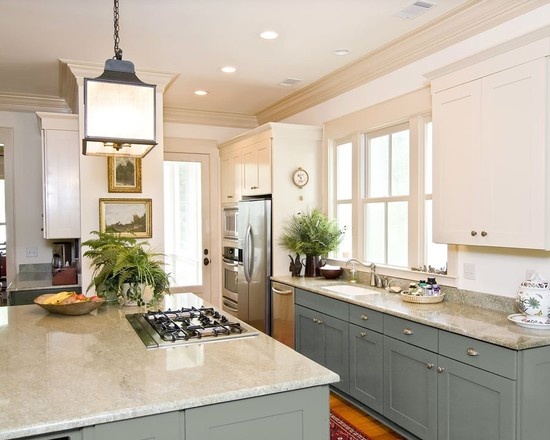
Choosing a cabinet color isn’t just about the cabinets themselves. You need to think about the countertops, backsplash, flooring, and even appliances. A color that looks perfect on its own might clash with your granite or make your stainless steel appliances look dull.
Coordination Checklist
- Compare your top cabinet colors next to your countertop and backsplash.
- Consider the undertones—are they warm (yellow, red) or cool (blue, gray)?
- Take photos of the combinations to review later.
- Ask for a second opinion from a friend or family member.
Pro tip: Some paint stores have color consultants who can help you match colors. This service is often free with a purchase.
Credit: thedecorologist.com
Mistakes To Avoid When Visualizing New Cabinet Colors
Changing cabinet colors is exciting, but it’s easy to make mistakes. Here’s what to watch out for:
- Choosing a color too quickly: Spend at least a few days living with samples or swatches.
- Ignoring lighting: Always test colors under your actual kitchen lighting.
- Forgetting about sheen: Glossy paints reflect more light; matte paints look softer. Try both.
- Not considering cleaning: Dark colors may show fingerprints, while white shows spills.
- Overlooking how color affects resale: Trendy colors can look dated in a few years. Neutrals are safer if you plan to sell soon.
Non-obvious insight: Don’t ignore the ceiling color. Sometimes, painting cabinets a new shade can make your ceiling look dingy or too bright by comparison.
Getting Professional Help
If you’re still unsure, or you want the most realistic preview possible, consider hiring a professional kitchen designer. Many offer 3D rendering services, where they’ll scan your kitchen and create a digital model with your chosen colors. Some even provide physical samples or mock-ups.
Cost data: Professional renderings usually cost between $100 and $500, depending on the designer and the complexity of your kitchen.
When to consider professional help:
- You’re investing in a full kitchen remodel
- You have custom cabinets or unique layouts
- You want to see multiple design options before deciding
If you want to explore this further, you can find helpful resources at the National Kitchen & Bath Association.
Step-by-step Plan For Seeing Your Cabinets In A Different Color
To bring everything together, here’s a practical workflow you can follow:
- Gather inspiration: Save photos of kitchens with colors you like.
- Use online visualizers: Try at least three different shades on your kitchen photo.
- Test with AR apps: Walk around your kitchen and see colors in real time.
- Order paint samples or swatches: Apply to your cabinets, board, or use peel-and-stick options.
- Observe at different times: Check how colors look throughout the day and night.
- Coordinate with other elements: Lay samples next to your countertop, backsplash, and floor.
- Ask for feedback: Get opinions from family or friends.
- Make your choice: Pick a color you love in all lights, not just in the store or on your phone.
Comparing Visualization Methods
To help you decide which approach is best for you, here’s a quick comparison:
| Method | Cost | Accuracy | Effort |
|---|---|---|---|
| Online visualizer tools | Free | Moderate | Easy |
| AR apps | Free or low-cost | Good | Easy |
| Paint samples | Low ($5-$10/sample) | Very high | Moderate |
| Vinyl wraps | Moderate ($20-$100+) | High | Moderate |
| Professional rendering | High ($100+) | Very high | Low (outsourced) |
Real-life Example
Let’s say you have honey oak cabinets and want to try navy blue. Here’s how you could preview the color:

Credit: apappainting.com
- Use the Sherwin-Williams or Home Depot app to upload a photo and “paint” the cabinets navy.
- Download the Project Color AR app and see the color live as you walk around.
- Buy a peel-and-stick navy blue swatch and test it on several doors, next to your countertop.
- If you love it, paint a spare cabinet door for a large-scale test.
- Check the color in morning light, afternoon, and with kitchen lights on at night.
- Compare the new look with your wall color and appliances.
- If you’re still unsure, take your photo to a local paint store for a designer’s opinion.
Frequently Asked Questions
What If My Cabinets Are Laminate Or Not Real Wood?
You can still visualize new colors using all the methods above. For physical testing, choose paint samples or vinyl wraps made for laminate surfaces. Some AR apps work just as well on laminate as on wood.
Can I Undo Paint Or Vinyl Wrap If I Don’t Like The Color?
Paint can be changed, but it takes work—sanding, priming, and repainting. Vinyl wraps are much easier to remove and won’t damage most cabinet surfaces if done carefully.
How Can I Pick A Color That Won’t Look Dated Soon?
Stick with classic neutrals like white, gray, navy, or soft green if you want a timeless look. Bold colors are fun but can go out of style faster. Browse kitchen trends on design websites for more ideas.
Do I Need To Empty My Cabinets To Test Colors?
For small paint samples or swatches, no. But if you’re doing a large test (like painting a whole door), it’s best to clear that area to avoid spills and get a clean result.
Can I See Cabinet Hardware In A Different Color Too?
Some online visualizers and AR apps let you change hardware colors as well. You can also buy inexpensive sample handles or knobs to test with your new cabinet color.
Changing your kitchen cabinet color can be a big decision, but with these methods, you’ll see your options clearly before making a commitment. Take your time, experiment with different tools, and trust your instincts. With careful planning, your new kitchen look will feel just right.