
If you’ve ever prepared for Shabbat, you know how important it is to follow the rules for using appliances. Modern ovens, like those from GE, have a special feature called Shabbos Mode. This mode helps Jewish families use their oven during Shabbat and holidays, following Halacha (Jewish law). But many people find it confusing to turn on and use Shabbos Mode, especially if they are new to these ovens or their instructions are unclear.
This guide will walk you through everything you need to know about how to turn on Shabbos Mode on a GE oven. You’ll learn not only the steps, but also the reasons behind each action, common mistakes, and practical tips. By the end, you’ll feel confident using your GE oven for Shabbat and holidays, without stress or worry.
What Is Shabbos Mode?
Shabbos Mode is a special setting found in many modern ovens and appliances. It adjusts how the appliance works so that it follows the rules of Shabbat and Yom Tov (Jewish holidays). On these days, Jewish law forbids certain actions, such as turning on or off electrical devices, adjusting temperature, or causing lights and displays to change. Shabbos Mode helps you avoid these issues.
When you activate Shabbos Mode on a GE oven, the oven:
- Disables oven lights or keeps them from changing when you open the door
- Stops beeping or turning on displays
- May change how buttons work (some buttons are ignored)
- Allows the oven to stay at a set temperature for long periods
Some models have extra features for Yom Tov Mode, which let you raise or lower the temperature in special ways. But Shabbos Mode is mainly about keeping the oven on, safely and legally, for food warming or cooking within the rules.
Why Do People Use Shabbos Mode?
For many Jewish families, having a working oven on Shabbat or holidays is essential. Meals are a big part of the celebration, and sometimes food needs to stay warm for many hours. But using a regular oven can break Shabbat rules by:
- Turning on oven lights or displays when you open the door
- Accidentally changing the temperature or turning the oven off
- Hearing sounds or seeing signals that are not allowed
Shabbos Mode solves these problems, making it possible to enjoy hot meals while respecting Halacha. It’s not only about convenience—it’s about following religious values in a modern kitchen.
Types Of Ge Ovens With Shabbos Mode
Not all ovens are the same. GE offers several models with Shabbos Mode, and the steps can differ. The main types include:
- GE Profile Series – High-end features, touch screens, advanced Shabbos settings
- GE Café Series – Premium look, often with WiFi and smart controls
- GE Monogram Series – Professional-grade, sometimes with unique controls
- GE Standard Models – Simpler controls, but still support basic Shabbos Mode
Before you start, check your oven’s user manual for your exact model number. This article will give you general steps, but your oven may have small differences.
How To Find Your Model
Look inside the oven door frame or on the front edge of the cooktop. The model number is usually on a small sticker. Knowing your model helps you find the right steps and avoid mistakes.
Preparing Your Oven For Shabbos Mode
Before you turn on Shabbos Mode, some basic preparation makes things easier. Here’s what you should do:
- Clean the Oven – Remove any crumbs or spills. This prevents smoke or odors during long heating.
- Check the Door – Make sure the oven door closes tightly. Shabbos Mode is safest when heat does not escape.
- Plan Your Meals – Decide which foods need to stay warm or cook overnight. Prepare trays or pans.
- Read the Manual – Each model can be different. Look for the section about “Sabbath Mode” or “Shabbos Mode” in your GE oven manual.
- Test the Feature – If you’ve never used Shabbos Mode, try it on a weekday first. This way you can fix any problems before Shabbat starts.
Non-obvious insight: Some foods cook differently in Shabbos Mode because the oven stays at one temperature for many hours. Test your recipes in advance so food is safe and tastes good.
Turning On Shabbos Mode: Step-by-step
Now let’s get to the main part: how to turn on Shabbos Mode on a GE oven. The steps below work for most models, but always check your manual for details.
1. Set The Desired Temperature
Before activating Shabbos Mode, you must choose your cooking or warming temperature.
- Press the Bake button.
- Use the number pad or arrows to select your temperature (for example, 180°F for warming).
- Press Start.
The oven will begin preheating.
2. Wait For Preheating (if Needed)
Some models require you to wait until the oven finishes preheating. This ensures you set Shabbos Mode at the right time.
- Check if your oven’s display tells you when preheat is done.
- If the oven does not beep or light up, estimate preheat time based on the temperature (usually 10–15 minutes).
3. Activate Shabbos Mode
The method depends on your oven’s controls. Here are the most common ways:
For Touchpad Models
- Press and hold the Bake and Broil pads at the same time for 3 seconds.
- Some models require you to press 9 and 0 together instead.
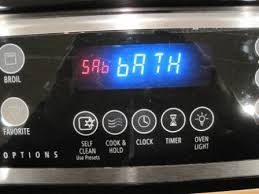
- The display will show “SAb” or “Shabbos” to confirm.
For Knob Or Button Models
- Set temperature as usual.
- Hold the Cook Time and Timer buttons together for 3 seconds.
- Look for the “SAb” message.
For Smart Or Wifi Models
- Open the oven’s menu (sometimes by pressing the Settings button).
- Scroll to Shabbos Mode or Sabbath Mode.
- Select On.
Non-obvious insight: On some GE ovens, you must turn on Shabbos Mode *before* setting the temperature. If you get an error, try changing the order.
4. Confirm Activation
Check the oven display. You should see:
- SAb (for Sabbath)
- Or a small light/icon
If you see this, Shabbos Mode is working. The oven will ignore most buttons, and the display will not change.
5. Add Your Food
Now you can put your food into the oven. Use oven mitts and trays that are safe for long cooking.
Tip: Open the oven door as little as possible. This keeps heat steady and saves energy.
What Does Shabbos Mode Do On A Ge Oven?
When Shabbos Mode is active, your oven works differently. Here’s a summary:
- No beeps or tones: All alert sounds are off.
- No display changes: The oven does not show new info or react to door openings.
- No lights on open: The oven light will not turn on or off when you open the door.
- No auto-shutoff: Many GE ovens turn off after 12 hours, but in Shabbos Mode, this is disabled.
- Temperature stays constant: The oven keeps the temperature you chose, unless you have a Yom Tov model.
This means you can open the oven to remove food without breaking Shabbat rules.
How To Turn Off Shabbos Mode
After Shabbat or the holiday is over, you’ll want to return your oven to normal.
- Press and hold the same buttons you used to activate Shabbos Mode (often Bake and Broil, or 9 and 0) for 3 seconds.
- The SAb display will disappear.
- The oven will return to normal operation.
If the oven is still hot, wait for it to cool before cleaning or making changes.
Using Yom Tov Mode (holiday Adjustments)
Some GE ovens include a special Yom Tov Mode for Jewish holidays. This lets you adjust the temperature in a permitted way.
- Activate Shabbos Mode as above.
- Use the Temperature button to raise or lower the setting (only in Yom Tov Mode).
- The oven may delay changes (to avoid instant reaction).
Important: On Shabbat (Friday night to Saturday night), you cannot change the temperature. Only do this on holidays if your Rabbi allows.
Credit: www.star-k.org
Safety And Halachic Considerations
Shabbos Mode is designed for safety, but you should still use care.
- Never leave food that needs stirring or mixing.
- Do not use the oven for foods that must be started or stopped during Shabbat.
- Make sure children do not play with the controls.
Halacha: Different communities have different customs. Ask your Rabbi if you are unsure about using Shabbos Mode, especially for baking or reheating certain foods.
Common Mistakes And How To Avoid Them
Even experienced users make errors with Shabbos Mode. Here are some of the most frequent mistakes:
1. Forgetting To Preheat
If you don’t preheat before Shabbat, you cannot raise the temperature later. Always start the oven early enough.
2. Opening The Door Too Often
Each time you open the door, heat escapes. This can make food unsafe if the temperature drops too low. Use a thermometer to check, if allowed.
3. Not Checking For Sab Display
If you don’t see SAb or “Shabbos” on the display, the mode is not active. Try again before Shabbat starts.
4. Using The Wrong Buttons
Different GE models have different controls. Pressing the wrong combination will not activate Shabbos Mode. Always keep your manual handy.
5. Ignoring Power Outages
If the power goes out, some ovens reset and leave Shabbos Mode. Check your oven if there is a storm or outage.
Pro tip: Tape a small note near your oven controls with the activation steps for quick reminders.
Table: Shabbos Mode Features On Ge Ovens
Here’s a comparison of Shabbos Mode features in common GE oven series.
| Feature | GE Profile | GE Café | GE Monogram | GE Standard |
|---|---|---|---|---|
| Shabbos Mode | Yes | Yes | Yes | Yes |
| Yom Tov Adjustment | Yes | Yes | Some models | No |
| WiFi Control | Some models | Yes | Yes | No |
| Auto-Shutoff Disabled | Yes | Yes | Yes | Yes |
| Manual Activation Steps | Touchpad | Touchpad/Menu | Touchpad/Menu | Buttons/Knobs |
Step-by-step Example: Turning On Shabbos Mode (ge Profile)
Let’s look at a real-world example using a GE Profile oven.
- Set the Temperature: Press Bake, enter 200°F, press Start.
- Wait for Preheat: Wait until the display shows “Ready.”
- Activate Shabbos Mode: Press and hold Bake and Broil together for 3 seconds.
- Check for SAb: The display changes to “SAb.”
- Place Food: Put your trays in the oven.
- After Shabbat: Press and hold Bake and Broil again for 3 seconds to exit.
Practical tip: If you hear any beeps or see the display change, try again or check your manual.
Table: Typical Button Combinations For Shabbos Mode Activation
Different models use different buttons. Here’s a quick reference:
| Model Type | Activation Buttons | Display Indication |
|---|---|---|
| Touchpad | Bake + Broil (3 sec) | SAb or Shabbos |
| Number Pad | 9 + 0 (3 sec) | SAb |
| Button/Knob | Cook Time + Timer (3 sec) | SAb |
| Menu System | Settings > Shabbos Mode | SAb or Sabbath |
How Shabbos Mode Affects Food Safety
One concern people have is food safety. With Shabbos Mode, the oven stays on for a long time, often over 24 hours. To keep food safe:
- Keep temperature above 140°F (60°C) to prevent bacteria growth
- Use covered pans to keep moisture
- Do not place raw foods inside during Shabbat; only warm up fully cooked food
- Check food with a thermometer before serving
Expert insight: Dry foods can become overcooked if left too long. Add a small pan of water in the oven to keep the air moist.

Credit: www.youtube.com
Advanced Features: Smart Ovens And Shabbos Mode
Some newer GE ovens connect to WiFi and smart home systems. You may wonder if you can use these features on Shabbat.
- WiFi controls are not allowed during Shabbat or Yom Tov. All settings must be made before.
- Some ovens let you schedule Shabbos Mode from your phone, but do this before Shabbat starts.
- If you are unsure, disable WiFi features before the holiday.
Important note: Technology is always changing. Ask your Rabbi about new features and whether they are allowed.
Table: Shabbos Mode Do’s And Don’ts
Here’s a quick summary for easy reference.
| Do | Don’t |
|---|---|
| Set temperature before Shabbat | Change temperature on Shabbat |
| Activate Shabbos Mode early | Rely on auto-shutoff to end cooking |
| Use only permitted foods and methods | Open the oven door often |
| Check that SAb is displayed | Ignore power outages |
| Ask your Rabbi if unsure | Use WiFi controls during Shabbat |

Credit: www.reddit.com
Extra Tips For First-time Users
- Practice Ahead: Try using Shabbos Mode on a weekday. This reduces stress before Shabbat.
- Leave Instructions: Print or write simple steps and stick them near your oven.
- Label Your Oven: If you have multiple ovens, mark which one is for Shabbos use.
- Set Reminders: Use your phone (before Shabbat!) To remind you to activate Shabbos Mode.
- Consult the Manual: User manuals are available online if you lose yours.
- Join a Community Group: Many Jewish communities have support groups or online forums for appliance tips.
Resource: For more details on Shabbos Mode and kosher appliances, see the OU Kosher appliance guide.
Frequently Asked Questions
How Do I Know If My Ge Oven Has Shabbos Mode?
Most modern GE ovens include Shabbos Mode, but some older or basic models do not. Check your manual or look for the “SAb” or “Sabbath” indicator on your oven’s display. If you see activation steps in the manual, your oven supports it.
Can I Cook Raw Food In Shabbos Mode During Shabbat?
No. Jewish law does not allow cooking raw food on Shabbat, even with Shabbos Mode. You may only keep already cooked food warm. On Yom Tov, cooking is allowed in some cases, but always check with your Rabbi.
What Happens If The Power Goes Out During Shabbos?
If your oven loses power, Shabbos Mode may deactivate, and the oven could turn off. Some models will resume, but most require you to reactivate the setting. Plan ahead, and use a backup plan for food if outages are common.
Can I Use The Oven’s Wifi Or App Features On Shabbat?
No. All programming and settings must be done before Shabbat. Using WiFi, apps, or smart controls during Shabbat is not permitted according to Halacha.
Why Does My Oven Beep Or Light Up Even In Shabbos Mode?
If your oven still beeps or the light changes, Shabbos Mode is not fully activated. Check your model number and review the steps. Some older ovens have limited features and may not fully support all Shabbos needs.
—
Modern kitchens can follow tradition and technology together with Shabbos Mode. Once you know how to turn on Shabbos Mode on your GE oven, you can prepare meals that are both delicious and respectful of Jewish law. Remember to read your manual, practice the steps, and always double-check before Shabbat begins.
With a little preparation, Shabbos Mode brings peace of mind—and warm food—to your table every week.