
Getting locked out of your oven can be frustrating, especially when you have dinner planned or are baking something special. Maytag ovens are reliable kitchen appliances, but sometimes their lock feature can activate—either by accident, during self-cleaning, or because of a malfunction. If you find yourself in this situation, don’t worry. Unlocking a Maytag oven is usually simple if you know the right steps. This guide will walk you through everything you need to know, from basic unlocking methods to troubleshooting, safety tips, and what to do if the oven refuses to unlock. Even if you’re not a technical person, you’ll find clear, practical instructions here.
Understanding Why A Maytag Oven Locks
Before you try to unlock your oven, it’s helpful to know why it locks in the first place. This understanding will make it easier to choose the right solution and avoid future problems.
Most Maytag ovens lock for these reasons:
- Self-cleaning cycle: The oven automatically locks for safety during self-cleaning, as temperatures get extremely high.
- Child lock or control lock: To prevent children from changing settings or opening the oven.
- Manual accidental lock: Sometimes, users press the lock button by mistake.
- System errors: Power failures or electronic glitches can cause the lock to activate.
Knowing which situation applies to you will help you solve the problem faster.
Key Features Of Maytag Oven Locks
Maytag ovens use different locking systems. Here are the most common types:
- Electronic lock: Controlled by buttons on the oven’s control panel.
- Manual lock lever: Found on some older models, usually a handle or small lever.
- Automatic lock: Engages during self-clean cycles and releases automatically afterward.
Understanding your model is important. Check your oven’s user manual or look for the model number (usually inside the oven door).
How To Unlock A Maytag Oven: Step-by-step
Let’s go through the main unlocking methods, depending on the reason for the lock.
1. Unlocking After Self-cleaning
If your oven is locked after a self-cleaning cycle, it’s usually for safety. The oven remains locked until it cools down to a safe temperature.
Steps:
- Wait for the oven to cool completely. This can take 30 minutes to 1 hour.
- Once cool, try opening the door. If it doesn’t open, press the Cancel or Off button on the control panel. This often resets the lock.
- If the door still won’t open, unplug the oven (or turn off the circuit breaker) for 1 minute, then restore power. Try again.
- If the lock persists, see the troubleshooting section below.
Non-obvious insight: Sometimes, the cooling fan inside the oven can keep running after the cycle. The door will not unlock until the fan shuts off, so listen for when the fan stops.
2. Unlocking The Control Lock (child Lock)
Many Maytag ovens have a control lock feature to prevent accidental use.
To unlock:
- Locate the Control Lock or Hold 3 Sec button on the panel.
- Press and hold this button for 3 to 5 seconds until you hear a beep or see a message on the display.
- The lock indicator light should turn off.
If you can’t find a dedicated button, look for a small padlock icon or check your user manual. The command is often printed near the button.
3. Unlocking A Manual Lock Lever
Older Maytag ovens may have a physical lever, usually above or below the oven door.
To unlock:
- Wait for the oven to cool if it just finished cleaning.
- Slide the lever back to the “Unlock” position.
- If the lever is stuck, do not force it—wait until the oven is completely cool.
Pro tip: If the lever feels stiff, sometimes gently wiggling it (without force) after cooling can help.
4. Power Reset Method
If your oven is stuck in “locked” mode due to an error or power issue:
- Unplug the oven from the wall outlet, or turn off the circuit breaker.
- Wait at least 1 minute.
- Plug the oven back in, or turn the breaker back on.
- Check if the lock is released.
This simple reset can clear many electronic glitches.
5. Using The Oven’s Display Panel
Many newer Maytag models have digital panels with unlock features.
- Look for a button labeled “Unlock”, “Control Lock”, “Oven Lock” or a padlock symbol.
- Press and hold as instructed in your manual (usually 3–5 seconds).
- If the oven is still locked, try resetting the power as described above.
What To Do If Your Maytag Oven Won’t Unlock
Sometimes, even after trying the usual steps, the oven door remains locked. This can be due to mechanical jams, sensor errors, or failed components.
Troubleshooting Steps
- Check for error codes: Your oven may display a code like “F9 E0” or “F5 E2.” Look up the meaning in your manual or online.
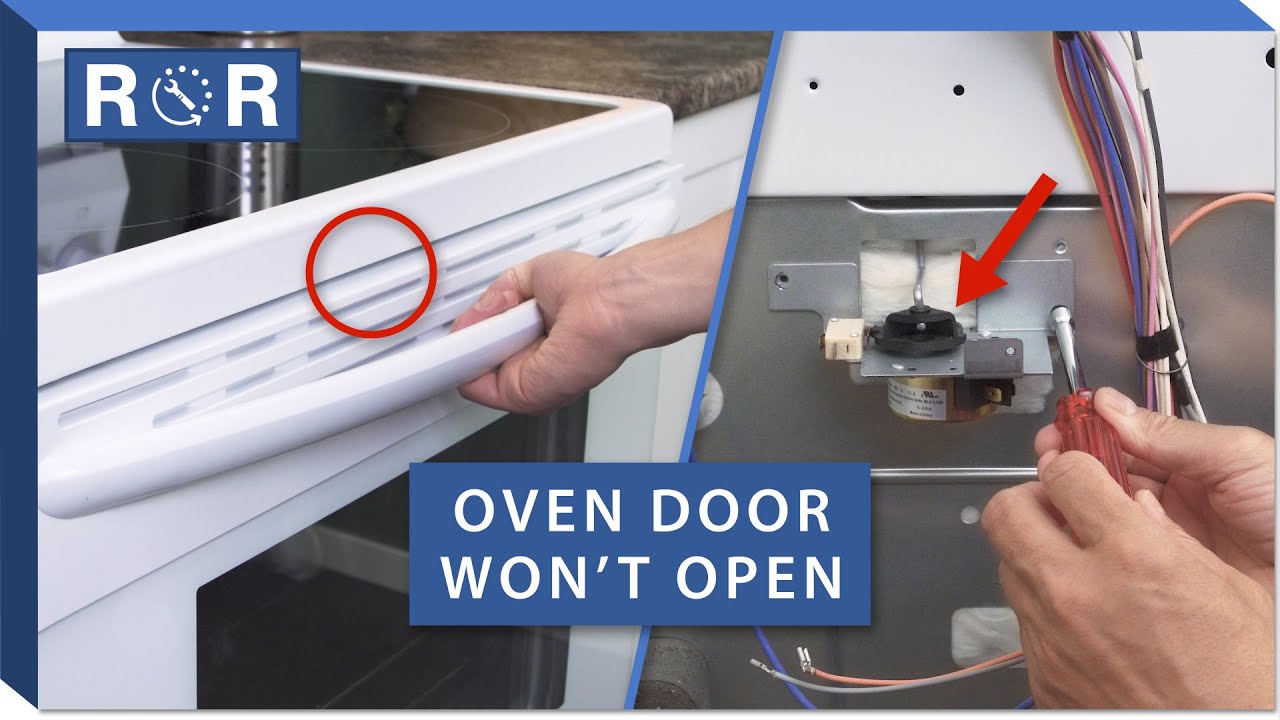
- Listen for motor sound: When you press unlock, do you hear the lock motor running? If not, the motor or switch may be faulty.
- Inspect the lock latch: Sometimes, food or grime can jam the latch. Shine a flashlight into the gap to check.
- Try another reset: Repeat the power reset and try unlocking again.
- Check for recent power outages: A power surge may have confused the control board.
If none of these work, you may need professional help.
When To Call A Technician
- If you hear grinding or clicking noises from the lock motor.
- If the control panel is unresponsive or shows error codes you don’t understand.
- If you’ve tried all unlocking methods with no success.
- If you suspect a broken lock mechanism.
Attempting to force the door open can cause further damage. It’s safer to get expert help at this point.
How To Prevent Oven Lock Problems
Unlocking your oven is one thing, but preventing future lockouts is even better. Here are some practical tips:
- Read your manual: Know your oven’s lock features and how to use them.
- Avoid activating self-clean by mistake: Double-check your button presses.
- Keep the control panel clean: Wipe with a dry cloth to prevent accidental button presses.
- Don’t force the lever: For manual locks, always wait for the oven to cool before moving the lever.
- Schedule regular maintenance: Small parts can wear out over time.
Non-obvious insight: Power surges can cause lock errors. Using a surge protector for your oven (if plugged in, not hardwired) can protect the electronics.
Comparing Maytag Oven Locking Systems
Not all Maytag ovens use the same locking method. Here is a simple comparison of the most common systems:
| Lock Type | How to Unlock | Common Models | Typical Issues |
|---|---|---|---|
| Electronic Lock | Press and hold unlock button | Modern built-in ovens | Panel errors, power glitches |
| Manual Lever | Slide lever after cooling | Older wall ovens | Stuck levers, jammed latch |
| Automatic Lock (Self-Clean) | Wait for oven to cool; cancel cycle | Freestanding ranges | Sensor failures, motor issues |
Knowing your oven’s system helps you choose the right unlocking method and avoid damage.
Common Error Codes And What They Mean
Maytag ovens display codes when things go wrong. Here are some typical lock-related error codes and their meanings:
| Error Code | Meaning | Action |
|---|---|---|
| F9 E0 | Door lock not operating | Try power reset; if persists, call technician |
| F5 E2 | Door latch not engaged | Check for obstructions; reset oven |
| LOC | Control lock active | Press and hold “Control Lock” button |
| F2 E1 | Stuck key | Clean panel; reset power |
If you see other codes, check your user manual or search the model number online.
Quick Reference: Unlocking Steps For Popular Maytag Models
Maytag produces many oven models, and their unlocking steps can differ slightly. Here are common models and their typical unlock instructions:
- Maytag Gemini Double Oven: Press and hold the “Control Lock” button for 3 seconds.
- Maytag MER8800FZ: After self-cleaning, wait until the oven cools; the door unlocks automatically.
- Maytag MGR8800FZ: Press “Cancel” to end self-clean, then wait for cool-down.
- Maytag CWE4800ACB (older model): Slide the manual lock lever to “Unlock” after cooling.
Tip: If you don’t know your model, open the oven door and check the frame for a label.
Safety Tips For Unlocking A Maytag Oven
Dealing with a locked oven means you’re often near hot surfaces or electronics. Keep these safety tips in mind:
- Always wait for the oven to cool before trying to unlock.
- Do not use tools to pry the door open—this can break the lock or glass.
- Unplug the oven before inspecting or cleaning the latch area.
- Keep children away from the oven when troubleshooting.
- Wear oven mitts if you must touch the door after self-cleaning—surfaces can stay hot.
What If Food Is Stuck Inside The Locked Oven?
This is a common and stressful situation. Here’s what to do:
- Don’t panic—most ovens unlock once cooled.
- Cancel any active cycle and wait for the oven to cool.
- Try a power reset as described earlier.
- If food is burning or there’s smoke, unplug the oven and call a technician immediately.
Practical advice: If you need to get food out quickly and nothing works, do not try to force the door. Contact Maytag support or a local technician for emergency unlocking.

Credit: www.youtube.com
How To Unlock A Maytag Oven Without A User Manual
Lost your manual? No problem. Here are general steps:
- Look for a lock or unlock button on the control panel.
- Try pressing and holding the button for 3–5 seconds.
- If that fails, unplug the oven for 1 minute, then try again.
- Search your oven’s model number online for a digital manual or instructions.
You can also find many official manuals on the Maytag official site.
When To Replace The Door Lock Assembly
If your oven repeatedly locks or won’t unlock, the door lock assembly may be worn out. Signs it needs replacement:
- Frequent lock errors, even after resets
- Loud grinding or clicking noises
- The lock motor runs but doesn’t engage
Replacing the assembly is a job for a professional unless you’re experienced with appliance repair. The part itself is not expensive, but installation requires opening the oven’s top or back panels.
Unlocking Maytag Wall Ovens Vs. Freestanding Ranges
There are differences in unlocking wall ovens and freestanding ranges:
| Type | Common Lock Feature | Typical Unlock Method |
|---|---|---|
| Wall Oven | Manual lever or electronic lock | Slide lever or press/hold unlock button |
| Freestanding Range | Automatic lock during self-clean | Wait for cool-down, then press Cancel |
Check your oven type before following instructions.
Advanced Troubleshooting: Dealing With Persistent Lock Problems
For stubborn lockouts, try these advanced steps:
- Inspect the lock motor and switch: If you’re comfortable, remove the oven’s back panel and check the lock motor for loose wires or signs of damage.
- Test the temperature sensor: Faulty sensors can cause the oven to “think” it’s still hot.
- Check the control board: If the display is dead or glitchy, the control board may need repair or replacement.
Expert tip: If you’re not sure, it’s best to call a professional. Advanced repairs can be dangerous if done incorrectly.

Credit: www.diychatroom.com
How To Reset A Maytag Oven After Unlocking
Sometimes, after unlocking, you need to reset the oven to clear any errors.
- Press Cancel or Off to end any active cycles.
- Unplug the oven for 1 minute, then plug it back in.
- Set the clock if prompted.
- Test the oven by starting and stopping a bake cycle.
If errors return, further diagnosis may be needed.
How To Find Your Maytag Oven Model Number
Finding your model number helps you get the right instructions. Look for a sticker or plate in these places:
- Inside the oven door frame
- On the oven’s control panel (side or bottom edge)
- Behind the drawer (for freestanding ranges)
- On the back of the oven
Write down the full model number for searches or when calling support.
Credit: www.youtube.com
Helpful Resources For Maytag Oven Owners
- Official Maytag website: Manuals, troubleshooting guides, and support.
- YouTube: Many appliance repair channels have step-by-step videos for common models.
- Appliance repair forums: Search your model and issue for shared experiences.
Frequently Asked Questions
How Long Does It Take For A Maytag Oven To Unlock After Self-cleaning?
After self-cleaning, the oven can stay locked for 30 minutes to 1 hour. The door unlocks only when the internal temperature is safe. If it stays locked after an hour, try pressing “Cancel” or unplugging the oven for a minute.
What Should I Do If The Control Lock Button Doesn’t Work?
First, check that you’re pressing and holding the correct button for 3–5 seconds. If nothing happens, try resetting the oven by unplugging it for a minute. If the lock still won’t disengage, the control panel or lock mechanism may be faulty.
Can I Unlock The Oven If The Display Panel Is Dead?
Yes, but you’ll need to perform a power reset. Unplug the oven or turn off the circuit breaker for 1 minute, then restore power. If the display remains dead, there may be a power supply or control board issue that needs professional repair.
Is It Safe To Force Open A Locked Oven Door?
No. Forcing the door can break the lock, damage the glass, or injure you. Always use the recommended unlocking steps. If the door won’t open, call a technician.
Where Can I Find My Maytag Oven Manual Online?
You can download manuals for most models from the Maytag official site. Enter your model number to get the right instructions.
Unlocking your Maytag oven doesn’t have to be stressful. With these clear steps and tips, you can handle most lock problems quickly and safely. If you ever feel unsure, it’s always best to call a professional to prevent damage or injury.
And remember, a little maintenance and care can keep your oven working smoothly for years to come.