
If you love baking or cooking at home, you know how important it is to have control over your oven. The Frigidaire oven is popular for its easy-to-use features, but many people do not fully use all the options it gives. One feature that can make your kitchen life easier is the Bake Time function. Using Bake Time correctly helps you bake food perfectly, save energy, and avoid burnt meals. But, if you are new to Frigidaire ovens, you might feel a bit lost about how to set and use Bake Time. This guide will walk you through every step, clear up common mistakes, and share real tips to help you get the best results from your oven.
Many manuals only explain the basics, but real cooking needs more details. In this article, you will learn how to set Bake Time, what happens when you use it, how it compares to other oven features, and practical tips for different kinds of recipes.
You will also find simple answers to the most common questions. By the end, you will be ready to bake with confidence using your Frigidaire oven.
Understanding The Bake Time Feature
The Bake Time function on a Frigidaire oven is designed for precision. It lets you set a specific baking duration, after which the oven automatically turns off or goes into a warming mode. This means you do not have to stand near the oven or worry about forgetting your food. It is especially useful for recipes with exact cooking times or when you have a busy schedule.
When you use Bake Time, the oven heats up to your chosen temperature and stays on for the number of minutes or hours you set. After the time is up, the oven either shuts off completely or switches to a keep-warm mode, depending on your model.
This helps prevent overcooking and saves electricity.
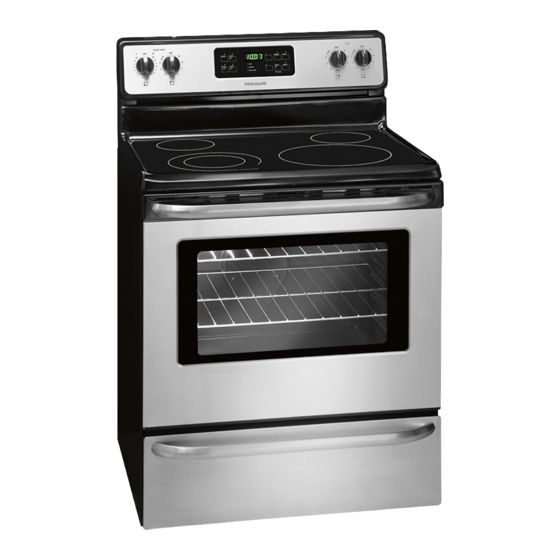
Most Frigidaire ovens have a digital control panel with buttons like Bake, Timer, Start, and Cancel. Some newer models might offer touchscreens or even smart controls, but the main process is similar.
Why Use Bake Time? Key Benefits
Using Bake Time is not just about convenience. Here are the main reasons why it can improve your baking and cooking experience:
1. Consistent Results
Setting a precise time helps you get the same results every time you bake. Your cakes, cookies, or casseroles will cook evenly, reducing the chance of burnt edges or raw centers.
2. Safety
Since the oven turns off automatically, you do not have to worry if you forget to check the oven. This is especially useful for people with busy lives or those who sometimes get distracted.
3. Energy Savings
The oven does not stay hot longer than needed. This lowers your electricity bill and is better for the environment.
4. Freedom
You can leave the kitchen or do other tasks without checking the clock constantly. Bake Time gives you peace of mind.
5. Helps With Multitasking
If you are preparing several dishes, Bake Time helps you manage your schedule and avoid mistakes.
Many users do not realize that using Bake Time also helps in situations where you want to pre-set the oven for friends or family. For example, you can set it up in advance, and the oven will handle the rest.
How To Use Bake Time On A Frigidaire Oven
Let’s break down the step-by-step process for using the Bake Time feature. You do not need advanced cooking skills—just follow these simple instructions.
Step 1: Prepare The Oven
- Make sure the oven racks are in the right position for your dish.
- Preheat the oven if your recipe asks for it. Some models start baking as soon as you set Bake Time, so check your manual.
- Make sure the oven is clean and free of any leftover food or grease.
Step 2: Set The Baking Temperature
- Press the Bake button on the oven control panel.
- Use the number pad or up/down arrows to enter your desired temperature (for example, 350°F or 180°C).
- Press Start to confirm the temperature.
Step 3: Set The Bake Time
- Press the Bake Time button (sometimes labeled as “Time Bake”).
- Enter the amount of time needed for your recipe using the number pad. For example, for 30 minutes, enter “3-0-0-0” (hours-minutes).
- If your oven has a separate Start button for time, press it to begin.
Step 4: Let The Oven Work
- Place your dish inside the oven.
- The oven will bake at the set temperature for the time you entered.
- A timer usually counts down on the display.
Step 5: Automatic Shut-off
- When the Bake Time ends, the oven will beep.
- It will either turn off or switch to a keep-warm mode, depending on your model.
- Remove your food carefully using oven mitts.
Step 6: Cancel Or Adjust (if Needed)
- If you want to stop the bake earlier, press the Cancel or Clear Off button.
- To add more time, reset the Bake Time and temperature as needed.
Example
Suppose you want to bake a cake for 35 minutes at 350°F:
- Press Bake, enter 350, and press Start.
- Press Bake Time, enter 35: 00, and press Start.
- Place the cake in the oven.
- Wait for the beep after 35 minutes, then remove the cake.
Understanding Control Panel Layouts
Frigidaire ovens come in different models, but most share similar control panel layouts. Here is a comparison of three common types:
| Model Type | Bake Button | Bake Time Button | Start/Cancel | Extra Features |
|---|---|---|---|---|
| Basic Digital | Physical button | Physical button | Physical buttons | Timer, Clock |
| Touchscreen | Touch interface | Touch interface | Touch interface | Delay Start, Pre-set Recipes |
| Smart Model | App & Touch | App & Touch | App & Touch | Remote Control, Wi-Fi |
If you are unsure which model you have, check the manual or look for labels near the display. Some older models may have knobs instead of digital buttons, but the main steps are similar.

Credit: www.reddit.com
Setting Bake Time Vs. Timer: What’s The Difference?
Many users confuse the Bake Time function with the regular Timer. These two have very different effects on your cooking:
| Feature | What It Does | Best For |
|---|---|---|
| Bake Time | Turns oven on for a set time, then turns off automatically | Baking, roasting, recipes with exact times |
| Timer | Counts down and beeps, but does not control oven operation | Reminders, timing other tasks, boiling, kitchen alerts |
A common mistake is using the Timer and expecting the oven to shut off. Only Bake Time controls the heating element.
Bake Time With Delay Start
Some Frigidaire ovens have a Delay Start option. This lets you set both the start and end times for your baking. For example, you could set the oven to start baking at 4:00 PM and finish at 5:00 PM, even if you are not home.
To use this:
- Set the Bake temperature as usual.
- Enter the Bake Time (for example, 60 minutes).
- Press Delay Start and enter the time you want the oven to begin.
- Press Start.
The oven will wait until the chosen time, then turn on and bake for the set duration. This is great for busy families or planning meals ahead.
Practical Tips For Getting The Best Results
1. Use An Oven Thermometer
Frigidaire ovens are accurate, but sometimes they can be off by a few degrees. An oven thermometer inside the oven helps you confirm the real temperature.
2. Adjust For Large Or Small Dishes
If you bake a very thick or large item (like a big lasagna), you may need to add 5-10 minutes to the Bake Time. For thin or small dishes, check for doneness a few minutes early.
3. Check For Even Baking
Halfway through the Bake Time, you can rotate your pan for more even cooking. This is especially helpful for cookies or pastries.
4. Learn Your Oven’s Hot Spots
Every oven has areas that are a bit hotter or cooler. After using Bake Time a few times, you’ll notice if one side browns faster. Adjust pan placement as needed.
5. Keep The Oven Door Closed
Opening the oven door loses heat and can affect the baking time. Use the oven light to check your food instead.
6. Clean Spills Quickly
Food spills can cause smoke and uneven heating. Clean up after each use for better results.
7. Don’t Overcrowd
If you bake multiple trays, leave space for air flow. Overcrowding can cause uneven results even with perfect timing.
8. Calibrate Your Oven
If you notice your food is always undercooked or overcooked, check the calibration in your oven’s settings. Some Frigidaire models let you adjust the default temperature.
9. Use The Right Bakeware
Glass, metal, and ceramic pans heat differently. Metal pans usually bake faster. Adjust Bake Time if you switch materials.
10. Avoid Using Foil On The Oven Floor
This can block air flow and affect baking accuracy. Place foil only on racks if needed.
These tips help you get the most from Bake Time, especially if you try new recipes often.
Common Mistakes And How To Avoid Them
Learning to use Bake Time is simple, but many beginners make these common errors:
1. Setting Only The Timer
Using the Timer instead of Bake Time means the oven will not turn off automatically.
2. Wrong Time Format
Some ovens need hours and minutes (for example, 1:00 for one hour). Read the display carefully.
3. Forgetting To Press Start
The oven will not begin until you confirm by pressing Start after setting both temperature and time.
4. Not Preheating When Needed
Some recipes need the oven hot before baking. Check if your model begins baking right away or after preheating.
5. Leaving Food In Oven After Time Ends
Even when the oven turns off, heat stays inside. Remove food quickly to prevent overcooking.
6. Misunderstanding Delay Start
If you set Delay Start but do not set Bake Time, the oven might not work as expected.
7. Power Outages
During a power outage, oven settings may reset. Always check your settings if the power blinks.
8. Ignoring Error Codes
If the display shows an error, consult your manual. Sometimes, a door not closed properly or a faulty sensor can stop Bake Time from working.
9. Not Cleaning The Control Panel
Grease or dirt can make buttons stick. Wipe gently with a soft cloth.
10. Setting Too Long Or Too Short Time
Carefully check your recipe’s timing. Setting an incorrect time can ruin your meal.
By knowing these mistakes and how to avoid them, you will save time, money, and avoid kitchen stress.
Which Foods Work Best With Bake Time?
Not every dish benefits from automatic timing. Bake Time is perfect for recipes with clear start and end points. Here are foods that work well:
- Cakes and Muffins: Most need exact baking times.
- Cookies: Good for consistent batches.
- Casseroles: Bake for set periods.
- Lasagna or Pasta Bakes: Avoids overcooking.
- Roasted Vegetables: Set and forget.
- Bread: Especially useful for loaves with fixed baking periods.
- Chicken Breasts or Fish Fillets: Prevents overcooking.
Foods that need frequent checking or basting (like some roasts) might not be ideal unless you pause to check them.
Bake Time And Food Safety
One thing that is often missed: food safety. If you use Bake Time with Delay Start for meat, dairy, or eggs, do not let the food sit at room temperature for long before cooking begins. Harmful bacteria can grow if food is not kept cold.
Always refrigerate perishable items until just before the oven starts. For best safety, only use Delay Start with foods that can sit safely at room temperature (like bread dough).

Credit: www.youtube.com
Troubleshooting Bake Time Issues
Sometimes, things do not work as expected. Here are quick solutions to common Bake Time problems:
- Oven Does Not Start
- Check that you pressed Start after setting both temperature and Bake Time.
- Make sure the oven door is closed.
- Display Shows Error
- Unplug the oven for 1 minute and plug it in again.
- If the error stays, check your manual or call customer service.
- Bake Time Ends Early
- Power outages can reset the clock.
- Some models have a maximum Bake Time (usually 12 hours).
- Food Is Not Cooked Enough
- Use a thermometer to check oven temperature.
- Add 5-10 minutes if needed and check for doneness.
- Oven Will Not Turn Off
- If the oven stays on after Bake Time, press Cancel or unplug for a few seconds.
If you have frequent issues, contact a certified service provider.
Comparing Bake Time With Other Cooking Modes
Frigidaire ovens offer several cooking options. Here’s how Bake Time compares:
| Mode | What It Does | When to Use |
|---|---|---|
| Bake Time | Automatically bakes for a set time, then turns off | Standard baking, consistent results |
| Broil | Heats from top, does not use Bake Time | Grilling, browning, fast cooking |
| Convection Bake | Uses a fan for even heat, can use Bake Time | Faster, more even baking |
| Self-Clean | High heat cleans oven, no Bake Time | Cleaning only |
Bake Time is for regular baking, not for broiling, self-cleaning, or reheating.
Credit: www.manualslib.com
Care And Maintenance For Accurate Bake Time
To ensure Bake Time works well every time:
- Clean the oven interior regularly.
- Wipe the control panel with a damp, soft cloth.
- Check the door seal for damage—heat can escape if the seal is broken.
- Avoid slamming the oven door, which can loosen connections.
- Replace the oven light if needed to easily check food without opening the door.
A well-maintained oven gives more accurate results, so your Bake Time function works perfectly.
Upgrading Or Replacing Your Frigidaire Oven
If your current oven lacks digital controls or Bake Time, you might consider upgrading. Newer Frigidaire models offer features like:
- Smart controls with Wi-Fi
- Touchscreen interfaces
- Pre-set recipes and automatic adjustment
- Energy-saving modes
Prices and features can be compared on the official Frigidaire website.
Expert Insights: Non-obvious Tips
Many home cooks miss these advanced tips:
- Combine Bake Time with Convection: If your oven has convection, try using both for faster, more even results. Lower the temperature by 25°F and reduce Bake Time by 5-10%.
- Use Multiple Bake Times: For layered baking (like a casserole with a cheese topping), set one Bake Time for the base, add the topping, then reset Bake Time for the last part.
- Write Down Your Favorite Settings: If you find a perfect time and temperature for a recipe, note it for next time. Small changes (like using a glass pan instead of metal) can affect results.
These tips come from experienced users and can save you time and stress.
Frequently Asked Questions
How Is Bake Time Different From The Timer On My Frigidaire Oven?
Bake Time automatically controls the oven, turning it off when the set time ends. The regular Timer only counts down and alerts you with a beep—it does not turn off or affect the oven heating.
Can I Use Bake Time For Broiling Or Self-cleaning Modes?
No, Bake Time works only with baking and some convection settings. Broiling and self-cleaning use different controls and do not allow you to set a baking time.
What Should I Do If My Oven Turns Off Before The Bake Time Ends?
Check for power interruptions or error messages on the display. If there was a power outage, you might need to reset the oven. For error codes, consult your manual or customer service.
Is It Safe To Use Delay Start With Perishable Foods?
It is not safe to let raw meat, dairy, or eggs sit at room temperature before baking begins. Use Delay Start only with foods that can stay out safely, like bread dough, or keep items refrigerated until just before baking starts.
Can I Adjust The Bake Time While The Oven Is Running?
Yes, on most models, you can press Bake Time again to enter a new time. Always check your manual for your specific model to be sure.
Baking should be enjoyable, not stressful. With the right knowledge, you can use the Bake Time feature on your Frigidaire oven to make perfect meals every time. Remember to follow your recipes, understand your oven, and use the extra insights shared here. Your kitchen confidence will grow with every bake!