
Everyday life can feel busy, and sometimes even small tasks like washing dishes take up precious time. That’s why dishwashers have become a must-have in many homes. Hotpoint, a trusted brand for home appliances, offers models with a unique feature: the one button operation. This makes using a dishwasher simpler than ever, even if you’ve never used one before. Still, many people feel unsure about how to use this function correctly. Maybe you wonder which detergent to use, how to load the dishes, or what happens if you press the button twice. This guide will answer all those questions and more.
If you want to make your life easier and get the best from your Hotpoint dishwasher, understanding the one button feature is key. This article will walk you through every step, from preparing your dishes to solving common problems. You’ll also learn tips that many beginners miss, and find out what to do if something goes wrong. Let’s dive in and turn your dishwasher into your favorite kitchen helper.
Understanding The Hotpoint Dishwasher One Button Feature
The one button on a Hotpoint dishwasher is designed for simplicity. Instead of choosing from many cycles or pressing several buttons, you just press one. This starts a program that’s designed to handle most daily dishwashing needs. For busy families or anyone who wants a no-fuss solution, it’s a game changer.
What Does The One Button Do?
On most Hotpoint models, the one button starts a pre-set wash program. This program is usually a standard cycle that cleans dishes, glasses, and cutlery well. You don’t need to adjust the temperature, cycle time, or drying settings. Just load the dishwasher, add detergent, and press the button.
Why Hotpoint Uses One Button
Hotpoint developed this feature after studying how people use dishwashers. Many users felt confused by too many options or worried about making mistakes. The one button approach means fewer errors and less time spent reading manuals. It’s also helpful for children, elderly users, and anyone who prefers things simple.
Getting Ready: Before You Press The Button
You can’t just throw dirty dishes inside and press start. Preparing your dishwasher and dishes is important for good results.
1. Scrape Off Food
Before loading, scrape large food scraps off plates and pots. You don’t need to rinse everything, but removing big pieces will prevent blockages.
2. Check The Filter
At least once a week, check the filter at the bottom of the dishwasher. A clogged filter can leave dishes dirty, even if you use the right program.
3. Choose The Right Detergent
Hotpoint recommends using dishwasher tablets or powders, not regular dish soap. Tablets are easiest for the one button program. If you use powder, measure the amount carefully (usually about 20-30 grams per cycle).
4. Refill Rinse Aid And Salt
- The rinse aid helps dishes dry without water spots.
- The dishwasher salt prevents limescale and keeps the machine working well, especially in hard water areas.
Check and refill both regularly. There are small indicator lights on most Hotpoint models to remind you.
5. Load The Dishes Properly
How you place dishes can change how clean they get. Here’s a quick guide:
- Plates and large items: Bottom rack, facing the center.
- Cups and glasses: Top rack, upside down.
- Cutlery: In the basket, handles down.
Don’t block the spinning arms or crowd the racks.

Credit: www.bigcentric.com
Step-by-step: Using The Hotpoint Dishwasher One Button
Let’s walk through exactly what to do when you want to run a cycle.
1. Open The Door And Load The Dishes
Pull out the racks and arrange your dishes as described above. Make sure nothing blocks the detergent dispenser.
2. Add Detergent
Put a dishwasher tablet in the main compartment. If you use powder, fill the compartment to the marked line.
3. Check Rinse Aid And Salt
Look for indicator lights. If they are on, refill as needed.
4. Close The Door
Push the racks back in and close the door firmly. The dishwasher will not start unless the door is completely shut.
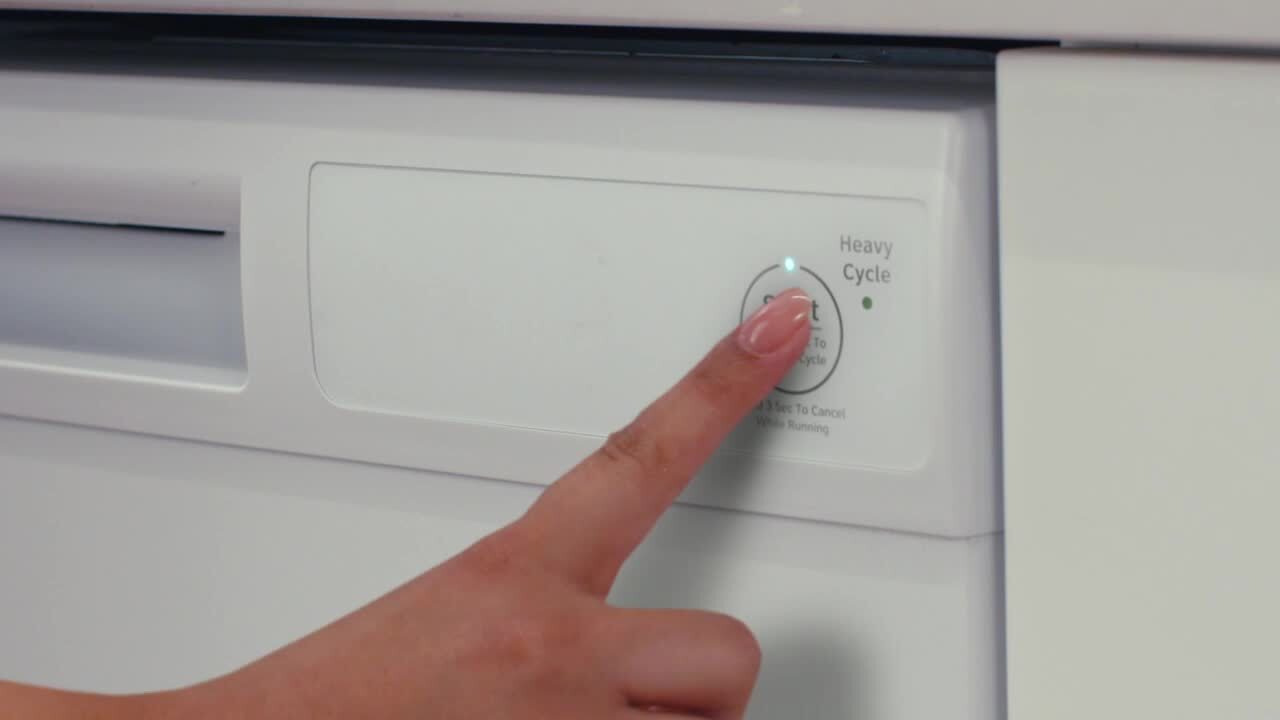
5. Press The One Button
Find the one button (often labeled “Start” or with a play symbol). Press it once. Most models will beep or light up to show the cycle has started.
6. Wait For The Cycle To Finish
The standard cycle usually takes between 1.5 to 2 hours. You’ll hear the dishwasher working. Some models have a light or beep when the cycle is done.
7. Open The Door Carefully
After the cycle, open the door a little and let the steam escape. Wait about 10 minutes before emptying, as dishes will dry better this way.
How The One Button Program Works
You might wonder what happens after you press the button. The program is designed to clean most everyday loads. Here’s a typical cycle breakdown:
| Stage | Time (approx.) | Purpose |
|---|---|---|
| Pre-wash | 10 minutes | Removes loose dirt |
| Main wash | 60 minutes | Deep cleans with detergent |
| Rinse | 15 minutes | Removes detergent |
| Drying | 20 minutes | Dries dishes with heat |
The total time is about 1 hour 45 minutes, but it can change based on the model.
What Makes The One Button Program Different?
Many dishwashers offer a variety of cycles: eco, quick, heavy-duty, glassware, and more. The one button program covers normal, everyday loads. It’s balanced for energy use, water efficiency, and cleaning power. Here’s how it compares:
| Feature | One Button Program | Other Programs |
|---|---|---|
| Cycle Length | ~1.5-2 hours | Varies (30 min – 3 hrs) |
| Water Use | Moderate (about 10-12L) | Low to high (7-16L) |
| Best For | Daily mixed loads | Special loads (pots, glass, eco) |
| Settings | Preset | Adjustable |
If you have a lot of pots, very dirty pans, or delicate glasses, other programs might be better. For most days, the one button is all you need.
Common Mistakes To Avoid
Even with a simple system, users often make small errors that lead to poor results or even damage. Here are mistakes to watch for:
1. Overloading The Dishwasher
If you cram too many items inside, the water and detergent can’t reach everything. Leave space between dishes.
2. Blocking The Spray Arms
Tall items or big pans can block the arms from spinning. Always check that the arms can move freely before you start.
3. Using Regular Dish Soap
Never use hand-washing liquid or normal soap. It creates too many suds and can damage the machine.
4. Forgetting To Refill Salt Or Rinse Aid
If you ignore the indicator lights, you’ll get spots on glasses or limescale buildup.
5. Pressing The Button Multiple Times
Press the one button just once. Pressing again may cancel the cycle or confuse the program.
6. Opening The Door Mid-cycle
If you open the door while it’s running, the cycle stops. Wait until it finishes.
7. Loading Non-dishwasher Safe Items
Wood, certain plastics, and nonstick pans can get damaged. Check labels before loading.

Credit: www.bensonsappliance.com
Advanced Tips For Best Results
Many users miss these small details that make a big difference:
Use The Right Water Temperature
Hotpoint dishwashers work best if your water heater is set to at least 120°F (49°C). Colder water can make detergent less effective.
Clean The Seals Regularly
Wipe the rubber door seals every few weeks. Food can collect here and cause smells or leaks.
Use The Eco Mode Occasionally
If your model has an eco mode, use it for half-full loads to save water and electricity.
Let Dishes Air Dry
If you’re not in a rush, open the door after the cycle and let the dishes air dry. This saves energy and reduces spots.
Run Hot Water Before Starting
Before you press the one button, run your kitchen tap until the water is hot. This means the dishwasher starts with hot water, improving cleaning.
Troubleshooting: What If Something Goes Wrong?
Even the best machines sometimes have problems. Here’s how to handle common issues:
Dishes Not Clean
- Check if you overloaded the racks.
- Make sure you’re using enough detergent.
- Clean the filter and spray arms.
Water Spots On Glasses
- Refill the rinse aid.
- Use less detergent if you have soft water.
Dishwasher Won’t Start
- Check the door is closed tightly.
- Make sure the power is on.
- If there’s a blinking light, look in your manual for what it means.
Bad Smells
- Clean the filter and check for trapped food.
- Run a hot cycle with a cup of white vinegar on the top rack (no dishes inside).
Machine Stops Mid-cycle
- Power outages or door opening can cause this.
- Press the one button again to restart, or unplug and reset if needed.
Credit: www.homedepot.com
Comparing Hotpoint’s One Button Dishwashers With Other Brands
You might wonder if the one button idea is unique or if other brands offer something similar. Here’s a quick comparison:
| Brand | One Button/Quick Start | Customization Options | Ease of Use |
|---|---|---|---|
| Hotpoint | Yes | Low (preset program) | Very Easy |
| Bosch | Some models | Medium (some quick/auto) | Easy |
| Whirlpool | No | High (many cycles) | Moderate |
| Samsung | Some models | Medium | Easy |
Hotpoint stands out for its true “press and go” simplicity, while other brands often require more choices.
Cleaning And Maintenance For Long Life
Your dishwasher can last over 10 years if you take care of it. Here’s how to keep it running well:
Weekly Tasks
- Wipe the door, controls, and seals.
- Check and clean the filter.
Monthly Tasks
- Run a hot empty cycle with dishwasher cleaner.
- Clean spray arms (poke out any blocked holes with a toothpick).
Every Few Months
- Check and refill dishwasher salt.
- Inspect hoses and connections for leaks.
Saving Energy And Water With One Button Use
Hotpoint’s one button program is designed to balance cleaning power and energy use. Here are some ways to save more:
- Only run full loads.
- Avoid pre-rinsing dishes under the tap.
- Use eco cycles when possible.
Did you know a dishwasher can use up to 80% less water than washing by hand? This saves both energy and money over time.
Practical Examples: Real-life Scenarios
Let’s look at a few examples to see how the one button program fits your daily routine.
Example 1: Busy Family Dinner
After a family meal, you have plates, glasses, serving bowls, and pans. Load the items, add a tablet, and press the button. By bedtime, everything is clean and dry.
Example 2: Flatmates Sharing A Kitchen
With different people cooking at different times, the dishwasher fills up slowly. Once it’s full, anyone can press the one button—no need to guess which cycle to use.
Example 3: Elderly User
For someone who finds technology confusing, the single button removes stress. No need to read tiny print or remember settings.
These examples show how the one button program fits many lifestyles.
Non-obvious Insights Beginners Often Miss
Let’s highlight two tips that many first-time users don’t realize:
1. Water Quality Matters
If you live in a hard water area, using dishwasher salt is vital. Skipping it can lead to limescale, cloudy glasses, and a broken machine. Always check your water type and adjust accordingly.
2. Detergent Placement Is Important
Putting the tablet directly in the bottom of the machine (not in the dispenser) can cause poor results. The timing of detergent release is controlled by the dispenser door. Always use it for best cleaning.
When Not To Use The One Button Program
While the one button is great for daily loads, there are times when you should choose a different cycle:
- Washing only glassware or delicate items
- Cleaning burnt pots and pans
- Half loads (use eco or quick wash if available)
- Sterilizing baby bottles (use high-temp or special cycles)
Check your manual for special programs if you have these needs.
Upgrading Or Replacing Your Hotpoint Dishwasher
If your machine is old or often breaks down, it might be time to upgrade. Newer Hotpoint models are quieter, more energy efficient, and have better one button programs. Look for features like:
- A+++ energy rating
- Adjustable racks
- Child lock
- Delay start
- Improved drying
Visit the official Hotpoint website for more details and the latest models.
Frequently Asked Questions
What Should I Do If The One Button Doesn’t Start The Dishwasher?
First, make sure the door is closed tightly and the power is on. If the machine doesn’t start, check for error lights or sounds. Unplug the dishwasher for 5 minutes, then try again. If it still doesn’t work, consult your manual or contact Hotpoint support.
Can I Open The Door While The One Button Program Is Running?
It’s best not to open the door while the cycle runs, as this interrupts the process and can cause leaks or burns from steam. If you must, pause the cycle (if your model allows) before opening, and close the door firmly to continue.
How Often Should I Clean The Filter?
Clean the filter at least once a week, or more often if you wash a lot of greasy or starchy items. A dirty filter leads to poor cleaning and bad smells.
What Kind Of Detergent Works Best For The One Button Program?
Use dishwasher-specific tablets for best results. Powders are also fine, but always measure the correct amount. Avoid gels or regular dish soap, as they may foam too much or not clean well.
Is The One Button Program Energy Efficient?
Yes, the program is designed to balance cleaning with low energy and water use. Running full loads and using eco settings when possible will save even more.
Using your Hotpoint dishwasher one button feature can quickly become second nature. With the right setup, a little regular care, and the tips in this guide, your dishes will be sparkling clean every time. Enjoy the extra free time and the peace of mind that comes with a reliable, easy-to-use appliance.