
If you own a pool with a saltwater system, you might already know how important the Intellichlor Salt Chlorine Generator is for keeping your water clean. However, when you see the Intellichlor flashing green and red, it can be confusing and worrying. What does it mean? Is your pool safe to swim in? How do you fix it? Many pool owners face this issue, but clear answers are often hard to find.
This guide explains everything about the Intellichlor flashing green and red lights. You’ll learn what these lights mean, what causes them, and how to solve the problem. If you want to keep your pool safe and your Intellichlor working, read on. You’ll find step-by-step advice, expert tips, and solutions that really work—even if you’re new to pool maintenance.
Understanding The Intellichlor Salt Chlorine Generator
Before fixing any problem, it helps to know what the Intellichlor does. The Intellichlor is a salt chlorine generator made by Pentair. It turns ordinary salt into chlorine, which keeps your pool water clear and free from algae and bacteria. Instead of adding chlorine tablets or liquid, you pour salt into your pool. The Intellichlor uses electricity to split the salt into sodium and chlorine. This process is called electrolysis.
The unit has different lights that show its status. Most of the time, you want to see a steady green light. But if you see a flashing green and red light, it means something needs your attention.
What Do The Green And Red Lights Mean?
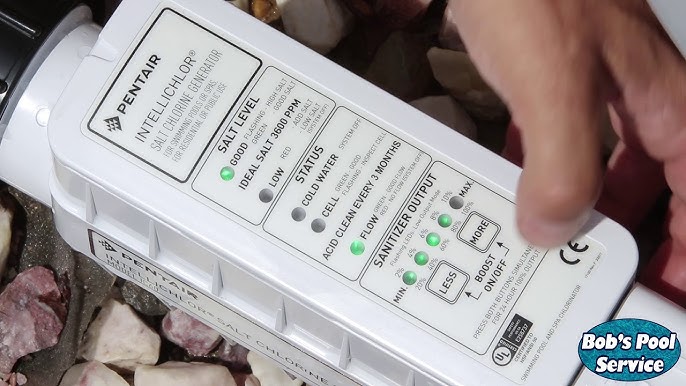
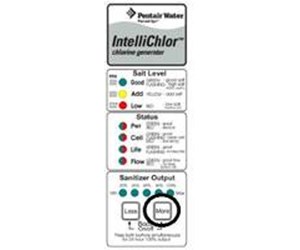
The Intellichlor cell has several lights on its top panel. Each light tells you something about how the system is working. Let’s focus on the two main ones:
- Green Light (Cell Status): Means the system is working normally.
- Red Light (Cell Status): Means there’s a problem with the cell.
When both are flashing, it usually means the system is trying to start but something is wrong. This warning is important—it can affect your pool’s safety and water quality.
Typical Light Patterns
Here’s a simple overview of what the main light patterns mean:
| Light Pattern | Meaning |
|---|---|
| Solid Green | Normal operation |
| Flashing Green | Start-up phase or low salt |
| Flashing Red | Problem detected (often cell issue or no flow) |
| Flashing Green and Red | Cell is starting up or there is a problem (often salt, flow, or cell condition) |
Common Reasons For Intellichlor Flashing Green And Red
Seeing a flashing green and red light is a sign to check your system. There are several common reasons for this warning:
- Low Salt Level: The salt in your pool may be too low for the system to work correctly.
- High Salt Level: Too much salt can also trigger a warning.
- Dirty or Scaled Cell: Calcium or debris buildup inside the cell can block the system.
- Poor Water Flow: The water may not be moving fast enough through the cell.
- Cold Water Temperature: The cell does not work well in cold water (below about 60°F / 16°C).
- Power Issues: Problems with the power supply or loose connections.
- Old or Worn-Out Cell: The cell has a limited lifespan (typically 3–5 years).
- Software or Control Panel Error: Sometimes, the system has a technical glitch.
Understanding these causes is the first step to solving the problem.
How To Diagnose The Problem
When your Intellichlor is flashing green and red, you should follow a logical process to find the cause. Here’s how to start:
1. Check Salt Level
Use a reliable salt test strip or digital meter to measure the salt in your pool. The ideal range for Intellichlor is usually 2700–3400 ppm (parts per million). If your salt is too low or too high, the system won’t work properly.
2. Inspect The Cell For Scale Or Debris
Turn off the power to the system. Remove the cell and look inside. If you see white or gray crust (calcium), or dirt, it needs cleaning. A dirty cell is one of the top causes for warning lights.
3. Check Water Flow
Look at the “Flow” light on the Intellichlor. If it’s off or red, your pump might not be running, or the filter could be clogged. Make sure all valves are open and the pool pump is working.
4. Test Water Temperature
If your pool is cold (below 60°F / 16°C), the Intellichlor may not produce chlorine. It’s a safety feature to protect the cell.
5. Check Power And Connections
Make sure the Intellichlor is plugged in and getting power. Look for any loose wires or connections at the control panel.
6. Review The Cell Life
If your cell is more than 3–5 years old, or you see a “Cell Life” warning, it may be time to replace it.
7. Reset The System
Sometimes, a simple reset solves the problem. Turn off the power for 1–2 minutes, then turn it back on. Check if the lights return to normal.
Credit: www.youtube.com
How To Fix Intellichlor Flashing Green And Red
Once you know what’s wrong, you can take action. Here’s how to fix each common problem:
1. Adjust Salt Level
If your pool’s salt is below 2700 ppm, add pool-grade salt. Sprinkle it into the deep end with the pump running. Wait a few hours, then retest. If the salt is above 3400 ppm, you’ll need to partially drain and refill the pool with fresh water. Retest to make sure you’re in the right range.
2. Clean The Cell
A dirty cell is a frequent cause of flashing lights. To clean it:
- Turn off all pool equipment.
- Remove the Intellichlor cell.
- Rinse off debris with a hose.
- For calcium buildup, soak the cell in a 4: 1 water-to-muriatic acid solution (always add acid to water, not the other way around).
- Let it soak for 15–30 minutes, then rinse again.
- Reinstall the cell and restart the system.
Tip: Always wear gloves and eye protection when handling acid.
3. Improve Water Flow
Check your pool pump, filter, and skimmer baskets. Clean or backwash the filter if needed. Open all valves and make sure nothing is blocking the water.
4. Wait For Warmer Water
If it’s cold outside, the cell may not work until the water warms up. This is normal in early spring or late fall.
5. Fix Power Issues
Check the circuit breaker and all cable connections. If you find corrosion or loose wires, fix them before restarting.
6. Replace A Worn-out Cell
If the cell has reached the end of its life, it won’t work even if you clean and reset it. Purchase a new cell that matches your Intellichlor model.
7. Reset The Control Panel
To reset the Intellichlor:
- Turn off the power at the breaker.
- Wait 2 minutes.
- Turn the power back on.
This often clears minor errors.
Common Mistakes To Avoid
Many pool owners make errors that can lead to Intellichlor flashing green and red or even damage the system. Here are key mistakes to avoid:
- Ignoring the Salt Range: Don’t guess the salt level. Always test it.
- Using Wrong Salt: Only use pool-grade, non-iodized salt. Table salt or rock salt can damage the system.
- Letting Scale Build Up: Clean the cell at least once every 3–6 months, even if the lights are normal.
- Running with Low Water Flow: Always check that the pump and filter are working before turning on the Intellichlor.
- Skipping Maintenance: Simple checks can prevent costly repairs.
- Not Replacing Old Cells: If your cell is past its expected life, a new one is usually the answer.
How To Extend The Life Of Your Intellichlor
Proper care can help your Intellichlor last longer and prevent annoying warning lights. Here’s what pool professionals recommend:
- Keep Salt in Range: Too little or too much salt shortens cell life.
- Balance Pool Chemistry: Keep pH, calcium, and alkalinity within recommended levels.
- Clean the Cell Regularly: Don’t wait for lights to flash.
- Run the Pump Enough: The cell only works when water is flowing. Most pools need 8–12 hours of circulation per day in hot weather.
- Store Properly in Winter: If you close your pool, remove and clean the cell before storing it indoors.
Real-world Example: Diagnosing A Flashing Green And Red Intellichlor
Let’s look at a real example. Susan owns a pool in Texas. One day, she sees her Intellichlor flashing green and red. Here’s how she solved it:
- She checks the salt: It’s only 2300 ppm (too low).
- She adds pool salt and waits 4 hours with the pump running.
- The light keeps flashing. She turns off the system and removes the cell. Inside, she finds white crust (calcium) blocking the plates.
- She soaks the cell in a water-acid mix, then rinses it.
- After reinstalling, the lights are solid green. Problem solved.
Insight: Often, more than one issue causes the warning lights. Don’t stop at the first fix—check everything.

Credit: www.reddit.com
Comparing Intellichlor With Other Salt Chlorine Generators
It helps to know how the Intellichlor compares to other systems when it comes to warning lights and troubleshooting. Here’s a quick look:
| Feature | Intellichlor | Hayward AquaRite | Jandy AquaPure |
|---|---|---|---|
| Salt Range (ppm) | 2700–3400 | 2700–3400 | 3000–3500 |
| Typical Light Error | Flashing green/red | Check salt/cell | Service, 120/121 code |
| Cell Life (years) | 3–5 | 3–5 | 3–5 |
| Common User Fix | Clean cell, adjust salt | Reset, clean cell | Clean cell, check wiring |
Signs That Your Intellichlor Needs Professional Help
Some problems are easy to solve, but others need a trained technician. Call for help if:
- The lights keep flashing after all fixes.
- The control panel won’t turn on.
- You see error codes you can’t clear.
- The cell leaks or looks damaged.
Trying to fix electrical or major problems yourself can be risky. A pool service professional can quickly diagnose and repair deeper issues.
Credit: www.inyopools.com
How To Read Intellichlor Error Codes
Some Intellichlor models show error codes along with flashing lights. These codes are helpful for deeper troubleshooting:
- Low Salt: Means salt is below 2700 ppm. Add salt.
- High Salt: Salt is above 3400 ppm. Dilute with fresh water.
- Check Cell: Clean or replace cell.
- No Flow: Pump or filter problem.
- Cold Water: Wait for water to warm.
If you see codes like “91” or “92” (on some models), check your manual for the exact meaning.
Practical Tips For Pool Owners
Here are some extra tips to make pool ownership easier:
- Write down your last salt addition so you don’t over- or under-dose.
- Test your pool water every week for salt, pH, and chlorine.
- Keep a spare cell O-ring in case your old one leaks.
- Take a photo of your cell’s wiring before removing it, so you can reconnect it correctly.
- Keep the manual handy (or bookmark the online version).
When To Replace Your Intellichlor Cell
The cell is the heart of the system, but it doesn’t last forever. Watch for these signs you need a new cell:
- You’ve cleaned it, salt and flow are correct, but it still flashes green/red.
- The cell is more than 5 years old.
- The plates inside look damaged or corroded.
- The system is not producing chlorine, even when everything seems right.
A new cell usually restores normal operation. Always buy a genuine Pentair replacement for the best results.
The Cost Of Ignoring Flashing Green And Red Lights
It’s tempting to ignore warning lights, but this can lead to:
- Green, cloudy, or smelly water (unsafe for swimming)
- Algae growth (hard to remove)
- More expensive repairs (if the cell or control box fails)
- Shorter equipment life
Fixing problems early saves money and keeps your pool safe.
How To Prevent Intellichlor Flashing Green And Red In The Future
Prevention is easier than repair. Here’s how to avoid future problems:
- Check salt, flow, and cell condition monthly.
- Clean the cell every 3–6 months (or as soon as you see scale).
- Keep your pool chemicals balanced: PH 7.2–7.8, alkalinity 80–120 ppm, calcium 200–400 ppm.
- Run your pump the correct number of hours (especially in hot weather).
- Winterize properly if you close your pool.
Troubleshooting Table: Quick Reference
Here’s a handy table for quick troubleshooting when your Intellichlor is flashing green and red:
| Problem | What to Check | Action |
|---|---|---|
| Flashing green/red | Salt level | Add or reduce salt as needed |
| Flashing green/red | Cell scaling | Clean cell with acid wash |
| Flashing green/red | Low flow | Check filter, pump, valves |
| Flashing green/red | Power connection | Inspect and tighten wiring |
| Flashing green/red | Old cell | Replace cell |
Frequently Asked Questions
Why Does My Intellichlor Flash Green And Red After Cleaning The Cell?
This usually means there is still an issue, such as low salt or poor water flow. After cleaning the cell, always check the salt level and run the pump for several hours. If the lights continue, there may be another problem such as a faulty flow switch.
How Often Should I Clean The Intellichlor Cell?
Most experts suggest every 3–6 months, but if you have hard water or see scale, clean it more often. Regular cleaning keeps the cell working and prevents warning lights.
Can I Use Table Salt In My Intellichlor System?
No. Only use pool-grade, non-iodized salt. Table salt often contains additives that can harm your system and cause errors.
What Is The Normal Salt Range For Intellichlor?
The ideal range is 2700–3400 ppm. Below this, the system won’t work well. Above it, you may get error lights and shorten cell life.
Is It Safe To Swim When The Intellichlor Is Flashing Green And Red?
It’s best not to swim until you fix the problem. The pool may not have enough chlorine, making it unsafe. Test your water and solve the issue before using the pool.
If you need official troubleshooting guides or further details, visit the Pentair Intellichlor page for the latest resources.
Taking care of your Intellichlor not only keeps your pool sparkling but also saves you money and stress. With the steps above, you can handle the flashing green and red lights confidently, even if you’re new to pool maintenance. Enjoy your clean, safe, and relaxing pool all season long!