
Owning an above-ground pool is a joy, but keeping the water clean and safe depends a lot on one device: the Intex pool pump. If you’ve ever wondered how to set the timer or how long your pump should run, you’re not alone. Many pool owners feel confused by timer dials, digital settings, and the right schedule for their pool. Understanding how to use your Intex pool pump timer not only saves you time and money, but it also protects your pool and makes summer swimming much more enjoyable.
This guide walks you through everything about Intex pool pump timer settings. You’ll learn what the timer does, how it works, step-by-step instructions for manual and digital timers, and how to choose the best schedule for your pool. We’ll also cover common mistakes, troubleshooting, and advanced tips to make pool care simple—even if you’re new to pool ownership. By the end, you’ll feel confident with your timer and enjoy crystal-clear water all season.
What Does The Intex Pool Pump Timer Do?
The pool pump timer is a built-in feature that allows you to automate when your pump turns on and off. Instead of running the pump all day or remembering to switch it manually, the timer does the work for you. This has several benefits:
- Saves electricity by only running the pump as needed
- Keeps water clean with regular circulation
- Extends pump life by preventing overuse
- Gives you peace of mind—no need to remember daily
Most Intex pumps have either a mechanical (dial) timer or a digital timer. Each type works a bit differently, but the goal is always the same: schedule your pool cleaning with less effort.
Types Of Intex Pool Pump Timers
Understanding the timer type on your pump is the first step. Here’s an overview:
Mechanical (dial) Timers
These have a round dial with numbers for hours, similar to an old kitchen timer. You set pins or tabs for start and stop times. When the dial reaches a pin, it turns the pump on or off.
Digital Timers
These use buttons and a small display screen. You program your schedule using the buttons, often with more precise control and sometimes multiple cycles per day.
Built-in Vs. External Timers
- Built-in timers: Most common on newer Intex models. The timer is part of the pump’s control panel.
- External timers: Plug-in devices used with pumps that don’t have timers. You set the schedule on the timer, and it controls power to the pump.
Why Timer Settings Matter For Your Pool
Choosing the right timer settings is more important than many people think. Here’s why:
- Water clarity depends on proper circulation. Too little, and algae grows. Too much, and you waste electricity.
- Chemical balance is easier to maintain with scheduled filtration.
- Equipment life improves with regular rest periods for the pump.
A good timer setting balances clean water, low energy costs, and pump health. One common mistake is thinking, “More is better. ” In reality, running your pump too much can wear it out and raise your power bill with little extra benefit.
How To Set A Mechanical (dial) Timer On An Intex Pool Pump
Mechanical timers are simple but require hands-on adjustment. Here’s how to set one:
- Locate the timer dial on your pump’s control panel. It’s usually a round clock-like dial with 24-hour markings.
- Set the current time. Rotate the dial until the arrow or “Time Now” pointer matches the actual time of day.
- Insert the timer pins/tabs. These small plastic pieces mark ON and OFF times. Place pins at the hours you want the pump to start and stop.
- Double-check AM/PM settings. Most dials show 1–24 hours but don’t distinguish AM/PM. Be sure you know if you’re setting morning or evening hours.
- Plug in the pump and switch the timer to “Timer” or “Auto” mode (not “On” or “Off”).
Example:
If you want your pump to run from 9am to 1pm, insert a pin at 9 and another at 13. The pump will turn on at 9:00 and off at 1:00.
Practical tip:
Test your settings by watching the dial. If you set a pin for just a few minutes ahead, you can see the pump turn on/off and check your work.
How To Program A Digital Timer On An Intex Pool Pump
Digital timers are more flexible but require a few button presses. Here’s a typical process:
- Power on the pump and locate the timer control buttons (often labeled “Timer,” “Set,” “+,” “-,” “Program”).
- Press “Timer” or “Program” to enter timer mode.
- Set the ON time. Use “+” and “-” buttons to choose when the pump should start.
- Set the OFF time. Repeat for when the pump should stop.
- Confirm and activate the schedule. Press “Set” or “OK” until the timer icon appears, meaning the schedule is active.
- Exit programming mode. The display should show the current time and a clock/timer symbol.
Some digital timers allow multiple cycles per day or week. Check your manual for special features.
Non-obvious insight:
Many people forget that digital timers often have a “manual override” button. This lets you run the pump outside the schedule without erasing your program—useful for quick cleaning or after a pool party.
Choosing The Best Timer Schedule For Your Pool
The ideal schedule depends on pool size, weather, use, and your pump’s strength. Here’s how to find the right balance:
Basic Rule: 1 Turnover Per Day
The pool “turnover” is the time it takes for all the water to pass through the filter once. Experts recommend at least one turnover per 24 hours. You can calculate this:
Pool Volume (gallons) ÷ Pump Flow Rate (gallons per hour) = Hours to turnover
Example:
If your pool holds 4,000 gallons and your Intex pump moves 1,000 gallons per hour, you need to run the pump for 4 hours each day.
Common Pool Pump Schedules
For most above-ground pools, here are typical timer settings:
- Small pools (under 5,000 gallons): 2–4 hours per day
- Medium pools (5,000–10,000 gallons): 4–6 hours per day
- Large pools (over 10,000 gallons): 6–8 hours per day
When To Run The Pump
It’s best to run your pump during the hottest part of the day, usually between 10am and 6pm. Sunlight encourages algae growth, so circulating water during daylight helps fight this. However, running at night can save on electricity if your utility offers lower “off-peak” rates.
Pro tip:
Split your run time into two cycles (morning and evening) if your pool gets heavy use or frequent debris.
Real-life Example Schedules
Here are sample timer schedules for different pools:
| Pool Size | Pump Power | Recommended Timer Setting |
|---|---|---|
| 3,000 gallons | 530 GPH | 6 hours (2 cycles of 3 hours: 9am–12pm & 4pm–7pm) |
| 6,000 gallons | 1,000 GPH | 6 hours (10am–4pm) |
| 10,000 gallons | 1,500 GPH | 7 hours (11am–6pm) |
Advanced Timer Features And How To Use Them
Some modern Intex pumps have extra timer features that make life easier:
Multiple Programs
You can set different ON/OFF cycles for different days or times, such as:
- Longer run times on weekends
- Shorter cycles during rainy weather
Boost Mode
This mode lets you run the pump for a few hours outside the normal schedule, helpful after a pool party or storm.
Vacation Setting
Some digital timers allow you to set a special “vacation” mode for when you’re away. The pump runs less often, but enough to keep water from turning green.
Child Lock
Prevents kids from changing your settings by mistake.
Non-obvious insight:
Not all Intex pump models support these features. Always check your manual or model number before searching for advanced options.
Step-by-step: Setting Up A New Intex Pool Pump Timer
If you just got a new pool or replaced your pump, setting up the timer is key. Here’s a quick checklist:
- Unpack and install the pump according to the manual.
- Plug in the pump to a grounded GFCI outlet.
- Prime the pump (fill with water) before first use.
- Set the current time on the timer (dial or digital).
- Program your ON and OFF times based on your pool’s size and usage.
- Test the timer to make sure it works—listen for the pump starting at the set time.
- Adjust schedule after the first week if needed.
Example:
If you notice cloudy water after a week, increase daily run time by 1 hour.

Credit: intexcorp.com
Comparing Intex Timer Settings To Other Brands
How does Intex compare to other popular above-ground pool pumps? Here’s a simple comparison:
| Brand | Timer Type | Programming Ease | Max Cycles Per Day |
|---|---|---|---|
| Intex | Dial/Digital (most models) | Easy | 1-2 |
| Bestway | Dial/Digital | Moderate | 1 |
| Hayward | Digital (premium models) | Easy/Advanced | Up to 8 |
| Summer Waves | Manual Only | Basic | 0 (manual on/off) |
Key takeaway:
Intex timers are designed for simplicity, making them a good choice for beginners. Higher-end brands may offer more cycles, but often with a steeper learning curve.
Common Mistakes People Make With Intex Pool Pump Timers
Even experienced pool owners sometimes get timer settings wrong. Watch out for these mistakes:
- Setting the wrong time of day. If the timer dial doesn’t match the actual time, your schedule will be off.
- Not adjusting for daylight saving time. Clocks change, but timers don’t—reset your timer each spring/fall.
- Forgetting to switch to “Timer” mode. Leaving the pump in “On” or “Off” mode ignores your programmed schedule.
- Running the pump all day. This wastes energy and can shorten pump life.
- Ignoring cloudy or green water. If your pool looks bad, increase pump run time and check chemical levels.
- Not cleaning the filter. A clogged filter reduces flow and makes the timer less effective.
- Not resetting after a power outage. Some digital timers lose settings if unplugged—check your schedule after storms.
Pro tip:
Mark your calendar to check timer settings once a month, especially after power outages or pool maintenance.
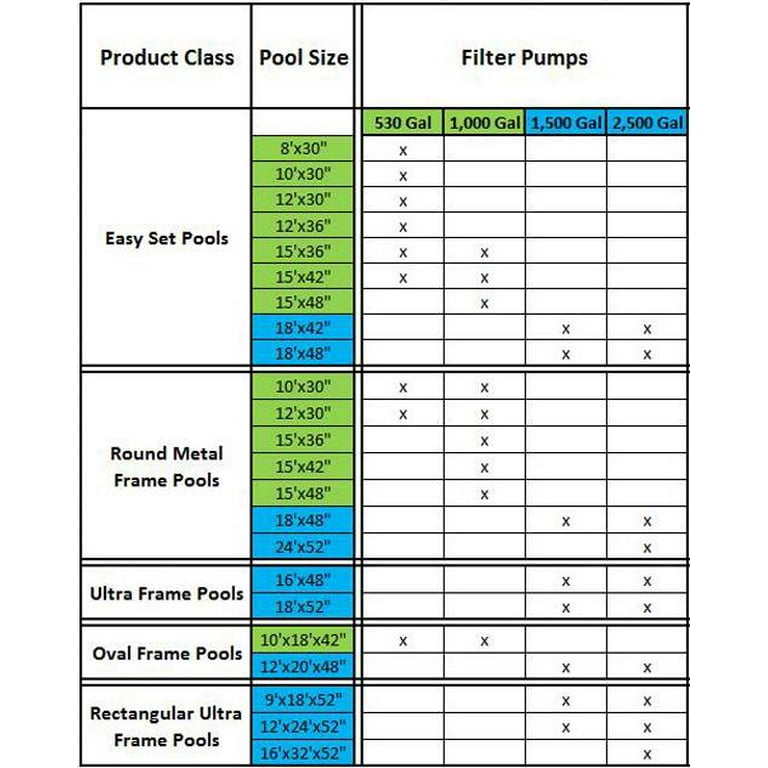
Credit: www.walmart.com
Troubleshooting Intex Pool Pump Timer Issues
If your timer isn’t working as expected, try these solutions:
Problem: Pump Doesn’t Turn On/off At Scheduled Time
- Check timer mode: Make sure it’s set to “Timer,” not “On” or “Off.”
- Verify current time: Set the dial or digital clock to the correct time.
- Inspect timer pins/tabs: For dial timers, ensure pins are firmly inserted.
- Look for power issues: Unplug and replug the pump; check the GFCI outlet.
Problem: Timer Loses Settings After Power Outage
- Digital timers: Some lose memory when unplugged. Reprogram the schedule.
- Mechanical timers: Usually keep settings, but reset the current time if needed.
Problem: Pump Runs Nonstop Or Not At All
- Check override button: Some digital timers have a manual override that can lock the pump ON or OFF.
- Replace timer pins: Lost or damaged pins/tabs need replacing.
- Inspect for debris: A jammed dial or button can stop the timer from working.
Extra tip:
If your timer is broken, you can use an external plug-in timer as a backup. Just set the schedule on the device and plug your pump into it.
Making The Most Of Your Intex Pool Pump Timer
To get the best results from your timer:
- Monitor water clarity. If water gets cloudy, increase run time.
- Adjust for weather. Hot, sunny days or heavy rain may require longer cycles.
- Clean the filter regularly. A clean filter helps the timer do its job.
- Test your timer after storms or power outages.
- Review your schedule every few weeks. Pool use and weather change over the season.
Practical example:
If you host a pool party, use the “Boost Mode” or manually run the pump for a few hours after to clear debris and body oils.
Environmental And Cost Benefits Of Using The Timer Correctly
Setting your Intex pool pump timer wisely isn’t just about convenience. It has real impacts on your wallet and the planet.
- Energy savings: The U.S. Department of Energy estimates that using a timer can reduce pool pump electricity use by up to 50%.
- Lower bills: Running your pump only as needed can save $100–$300 per season.
- Reduced noise: The pump won’t run all night, keeping your backyard quieter.
- Longer pump life: Scheduled use prevents overheating and extends equipment lifespan.
Non-obvious insight:
If you live in an area with “time-of-use” electric rates, set your timer to run during off-peak hours for even bigger savings.
When To Adjust Your Intex Pool Pump Timer
The right schedule may change throughout the year. Adjust your timer when:
- Opening the pool: Run the pump longer (8–12 hours per day) to clear winter debris.
- High usage: More swimmers means more cleaning—add an extra hour or two.
- After storms: Run the pump longer to clear dirt, leaves, and algae spores.
- Closing the pool: Gradually reduce run time as the water cools and the pool is used less.

Credit: www.reddit.com
How To Find Timer Settings For Your Intex Model
Intex has many pool pump models, each with slightly different timer controls. Always check your user manual for the exact steps and features. If you’ve lost your manual, you can find digital copies on the Intex official website or reputable pool forums.
Example:
The Intex Krystal Clear 1500 GPH model uses a digital timer with 1–12 hour settings in 1-hour increments, while the 1000 GPH model uses a dial timer with 15-minute pins.
External resource:
For detailed model-specific instructions and troubleshooting, visit the Intex Support Center.
Safety Tips When Using Intex Pool Pump Timers
- Always use a grounded GFCI outlet for your pump.
- Keep the timer and pump dry. Water can damage electrical parts.
- Do not modify the timer or bypass safety features.
- Supervise children around the pool and pump controls.
- Unplug before cleaning or servicing the pump.
Important:
If your timer or pump gets wet or stops working, unplug it immediately and have it checked by a qualified technician.
Upgrading Or Replacing Your Pool Pump Timer
If your built-in timer fails, you can often use a plug-in external timer as a replacement. Look for timers rated for outdoor use and able to handle your pump’s voltage and amperage. If you upgrade to a larger pump, make sure the timer is compatible.
Example:
An outdoor-rated digital timer from a hardware store can handle up to 15 amps—enough for most Intex pumps.
Frequently Asked Questions
How Long Should I Run My Intex Pool Pump Each Day?
Most pools need at least one full turnover of water per day. For Intex pools, this usually means 4–8 hours, depending on your pool’s size and pump strength. Adjust the timer if water gets cloudy or after heavy use.
Can I Use A Smart Plug Or Wi-fi Timer With My Intex Pump?
Yes, many Intex pumps work with smart plugs or Wi-Fi timers, as long as the device can handle the pump’s power needs. This lets you control the schedule from your phone. Always choose a weatherproof smart plug for outdoor use.
My Timer Loses Settings After A Power Outage. What Should I Do?
Some digital timers lose their programming when unplugged or after a power cut. Check your settings and reprogram as needed. Consider using a timer with a battery backup for reliability.
Is It Better To Run The Pump During The Day Or At Night?
Both have advantages. Running during the day fights algae growth (since sun feeds algae). Nighttime operation can be cheaper if your utility offers lower rates after dark. Some pool owners split the run time between day and night.
Why Is My Pump Still Running After The Timer Is Set To Off?
Check for a manual override button or switch. Some timers have a “bypass” mode that keeps the pump on. Also, make sure the timer is set to “Auto” or “Timer” mode, not “On. ” If problems continue, your timer may need repair or replacement.
Taking control of your Intex pool pump timer settings puts you in charge of your pool’s health, your energy bill, and your summer fun. With a little practice and these tips, you’ll keep your water sparkling and your pool worry-free, season after season.