
If you own a pool with a Pentair Intellichlor salt chlorinator, you expect it to work smoothly—keeping your water clean and safe. But sometimes, you might walk out to your pool and notice something worrying: the Pentair Intellichlor is not lighting up. No glowing lights, no status indicators, nothing. For many pool owners, this can be both confusing and stressful, especially if you’re not sure what’s wrong or how to fix it.
This problem isn’t just about missing lights. It could mean your chlorinator is not making chlorine. That can quickly lead to cloudy water, algae growth, and a pool that’s not safe for swimming. You might wonder if you need a new unit, or if there’s a simple solution. This article will guide you through every possible cause, how to diagnose the issue, what steps to take, and when you should call a professional. You’ll get clear explanations, practical advice, and tips to avoid common mistakes. Whether you’re a new pool owner or have dealt with pool equipment for years, you’ll find answers here.
Understanding The Pentair Intellichlor System
Before jumping into troubleshooting, it helps to know how the Pentair Intellichlor works. This device is a salt chlorine generator. It turns salt in your pool into chlorine using electrolysis. The unit has a cell with metal plates. When powered, it uses low-voltage electricity to split salt (sodium chloride) into chlorine and sodium.
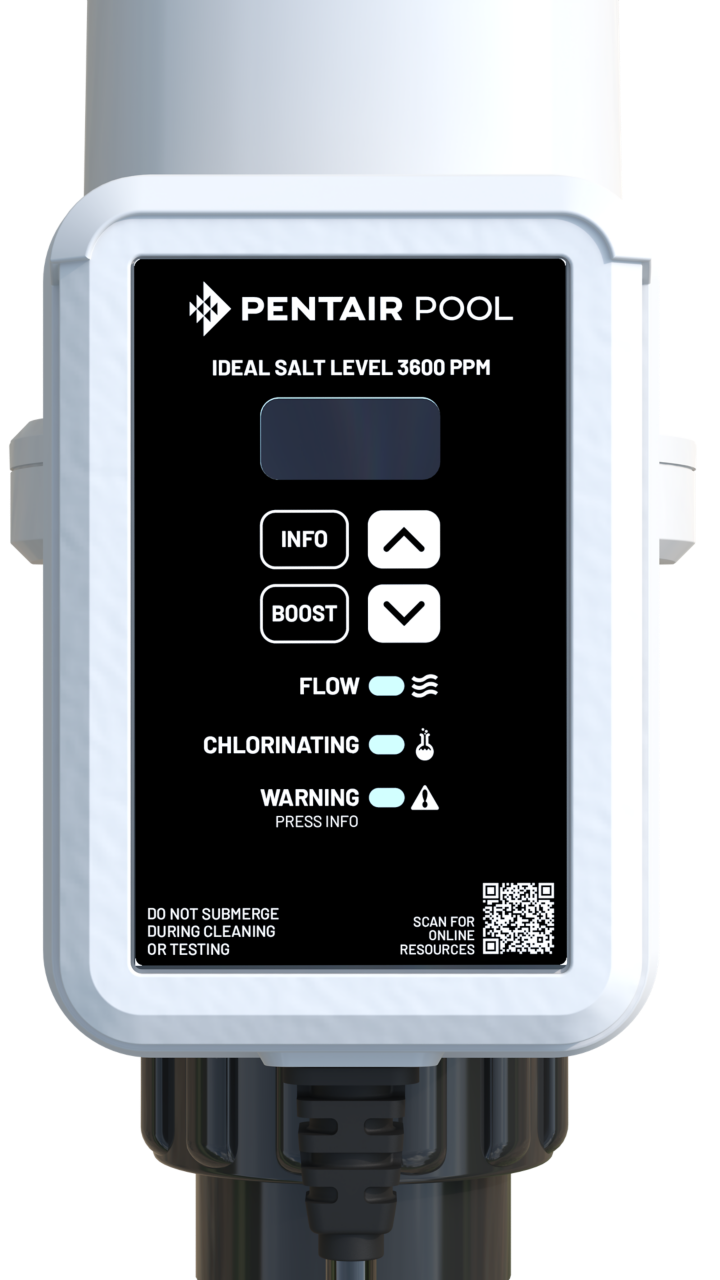
The Intellichlor includes a power supply (often called the Power Center) and the cell itself. The cell has LED indicator lights to show its status: green for normal, red for problems, and others for salt levels and output. When these lights don’t turn on at all, it’s a sign that something is wrong with power, the cell, or the connections.
Main Reasons Why Your Pentair Intellichlor Is Not Lighting Up
Let’s break down the main reasons for a “no lights” problem. Each cause needs a different approach.
- No Power to the Cell
- Blown Fuse in Power Center
- Loose or Corroded Connections
- Defective Power Center
- Damaged or Worn-Out Cell
- Low or High Salt Level
- Water Flow Problems
- Control Board Failure
- Incorrect Wiring After Installation or Service
- GFCI or Circuit Breaker Issues
- Internal Cell Wiring Failure
- Timer or Automation System Faults
- Environmental Damage (Heat, Moisture, Insects)
- Software or Firmware Glitches
- Aging System (End of Service Life)
Each of these issues can prevent the Intellichlor from lighting up. Some are easy fixes; others need more advanced troubleshooting.

Credit: www.youtube.com
Quick Checks: Before You Start Troubleshooting
Before you open tools or call for help, do these simple checks. They solve many “no light” problems and save time.
- Check if the pool pump is running. The Intellichlor only works when the pump is on and water is flowing.
- Look at the main power switch. Make sure it’s in the ON position.
- Inspect the power cable. Ensure it’s plugged in firmly, with no visible damage.
- Check the GFCI (ground fault circuit interrupter) or circuit breaker. Reset if tripped.
- Clean off any visible dirt or debris from the cell and connections.
These steps often fix the issue in a few minutes. If the lights are still off, move to deeper troubleshooting.
Diagnosing No Power: Step-by-step
If the quick checks don’t solve the problem, you’ll need to diagnose further. The following steps will help you find where the power stops.
1. Confirm Power At The Power Center
The Power Center is usually a gray box near your pool equipment. It supplies low-voltage DC power to the cell.
- Open the cover (use caution).
- Use a multimeter to check for incoming AC power (usually 120V or 240V).
- If no power, check your home’s circuit breaker panel or timer.
Non-obvious insight: Sometimes, timers are set incorrectly after a power outage, so the cell never gets power.
2. Check The Fuse
Inside the Power Center, there’s a small glass or ceramic fuse. If blown, the cell won’t light up.
- Turn off all power before opening.
- Locate the fuse (see the manual for location).
- Remove it and check if the wire inside is broken or burned.
- Replace with the same type and rating if needed.
Tip: Fuses can blow from lightning, surges, or old age—not just from a bad cell.
3. Inspect The Cell Cable And Plug
The Intellichlor cell is connected by a cable to the Power Center.
- Look for cracks, splits, or water in the plug.
- Unplug and re-plug the connector to clear corrosion.
- Clean with contact cleaner if you see green or white powder (corrosion).
Practical example: Even a tiny bit of corrosion can block all power to the cell.
4. Test The Cell Directly
If you have a spare working cell, swap it in. If it lights up, your original cell is likely faulty. If both don’t light, the issue is before the cell.
Credit: www.pentair.com
Deeper Troubleshooting: Causes And Fixes
Some problems are more complex and need detailed checks.
Defective Power Center
If the Power Center has power and a good fuse, but the cell doesn’t light up, the unit itself may have failed.
- Smell for burned or melted plastic.
- Look for water stains, insect nests, or rusty spots.
- Check output voltage with a multimeter (should match cell specs, usually 22-39V DC).
Caution: Do not open sealed parts. If you suspect internal failure, replace the Power Center.
Damaged Or Worn-out Cell
Intellichlor cells last 3–7 years, depending on use.
- Check the cell for heavy scale, broken plates, or leaks.
- If the “Cell” or “Flow” LEDs never light up, and the cell is old, it may be at the end of its life.
- If you hear rattling inside, the plates may have broken loose.
Non-obvious insight: Over-cleaning with acid can shorten cell life.
Low Or High Salt Level
The cell will not operate if the salt level is outside the safe range.
- Ideal salt level: 3000–4200 ppm (parts per million).
- Below 2800 ppm: Cell may shut down with no lights.
- Above 5000 ppm: Cell may also shut down to protect itself.
Use salt test strips or a digital tester to check. Adjust as needed.
Water Flow Problems
The cell needs a strong flow of water to operate.
- Check your pump and filter for blockages.
- Make sure all valves are open.
- The Intellichlor has a flow sensor; if it detects low flow, all lights may stay off.
Example: A dirty filter can reduce flow enough to keep the cell off.
Control Board Failure
Inside the cell or Power Center, a small control board manages power and lights.
- If all else checks out, but no lights, the control board may be bad.
- This is usually not repairable—replace the faulty unit.
Incorrect Wiring
After repairs or new installation, the cell may be wired wrong.
- Double-check wiring matches the manual.
- Ensure all wires are tight, with no loose or bare spots.
- If you’re unsure, have a professional check.
Common mistake: Swapping the “line” and “load” wires can prevent power from reaching the cell.
Gfci Or Circuit Breaker Issues
Some Intellichlor units are wired through a GFCI outlet or breaker.
- GFCIs trip for safety if they sense moisture or a fault.
- Reset the GFCI outlet or breaker.
- If it keeps tripping, there may be a deeper electrical problem.
Internal Cell Wiring
Cells have internal wires that can corrode or break.
- This is rare, but possible, especially in older units.
- There’s no simple fix; replace the cell.
Timer Or Automation System Faults
Many pools use automation systems or timers to control the chlorinator.
- If the timer is broken or set incorrectly, the cell won’t get power.
- Automation systems may “lock out” the cell if sensors detect a problem elsewhere.
Environmental Damage
Heat, humidity, rain, and insects can damage Intellichlor parts.
- Look for nests, rust, or water inside the Power Center.
- Protect your equipment from sun and rain for longer life.
Software Or Firmware Glitches
Some newer Intellichlor models have digital controls.
- Sometimes, software can “freeze.”
- Try resetting by cutting power for 30 seconds, then restarting.
Aging System
Intellichlor systems have a service life of 5–10 years.
- After this time, failures become more common.
- If you’ve replaced the cell and Power Center and still have issues, it may be time for a full upgrade.
Real-world Examples
It helps to see what these problems look like in real pools.
Example 1: John’s pool was perfect until a summer storm. The next day, the Intellichlor had no lights. He found the GFCI outlet had tripped. After resetting it, the lights returned.
Example 2: Maria noticed her pool was cloudy. The Intellichlor had no lights. She opened the Power Center and found a blown fuse. After replacing it, the cell lit up and started producing chlorine again.
Example 3: A pool service tech found that the cell plug was full of ants. After cleaning it out and reseating the plug, the Intellichlor came back to life.
Example 4: Tom’s Intellichlor was over 8 years old. No lights, despite good power. A new cell fixed the problem.
Table: Common Causes And Solutions For No Lights
Here’s a quick reference for the most common reasons your Pentair Intellichlor may not light up and what you can do.
| Cause | How to Check | Solution |
|---|---|---|
| No power to Power Center | Test with multimeter | Restore power, check breaker |
| Blown fuse | Inspect fuse in Power Center | Replace fuse |
| Loose/corroded connections | Inspect plugs/cables | Clean or replace as needed |
| Bad cell | Swap with working cell | Replace cell |
| Low water flow | Check pump, filter, valves | Fix flow issue |
| Incorrect salt level | Test salt ppm | Add or dilute salt |
| Failed control board | All else checks out | Replace Power Center/cell |
Table: Intellichlor Light Status Meanings
Knowing what the lights mean can help you spot problems before they get worse.
| Light | Color | Meaning |
|---|---|---|
| Power | Green | Normal operation |
| Cell | Green | Producing chlorine |
| Flow | Green | Good water flow |
| Salt | Green | Salt level OK |
| Power | Off | No power/major fault |
| Any | Red | Problem detected |
Common Mistakes To Avoid
Even experienced pool owners make mistakes when their Intellichlor stops lighting up. Here are some to watch out for:
- Replacing the cell before checking power/fuse. Many people buy a new cell, only to find the problem was a blown fuse or tripped breaker.
- Ignoring salt level. Low or high salt can cause the cell to turn off with no warning.
- Not checking the flow. A clogged filter or closed valve often causes “no lights.”
- Over-acid washing the cell. Too much acid can damage the plates and shorten cell life.
- Forgetting about timers. If the timer is off or set incorrectly, the cell never gets power.
- Assuming the worst. Often, simple fixes solve the problem faster and cheaper than replacing parts.
When To Call A Professional
Some issues are safe and easy to fix yourself, like resetting a breaker or replacing a fuse. But you should call a pro if:
- You’re not comfortable working with electricity.
- You suspect a wiring problem.
- The Power Center smells burned or shows water damage.
- You’ve tried all basic steps and nothing works.
A certified pool technician can safely diagnose and fix advanced issues. They also have tools and parts not available to most homeowners.
Preventing Future Problems
You can prevent most “no light” issues with a few simple habits:
- Check salt level every month.
- Clean the cell only when needed, and use mild acid.
- Keep the Power Center dry and protected from sun/rain.
- Inspect plugs and cables yearly for corrosion or wear.
- Run the pump at least 8 hours per day in summer.
- Update automation software if your system has updates.
- Schedule yearly professional service for peace of mind.
Table: Diy Vs. Professional Fixes
Not sure what you can do yourself and what needs an expert? Here’s a guide.
| Problem | DIY Possible? | When to Call a Pro |
|---|---|---|
| Reset GFCI/breaker | Yes | If breaker keeps tripping |
| Replace fuse | Yes | If fuse blows again quickly |
| Swap cell | Yes | If new cell doesn’t work |
| Check wiring | No | Always call a pro |
| Replace Power Center | No | Always call a pro |
Tips For Long-term Intellichlor Performance
- Run the cell at the lowest output needed to maintain chlorine (usually 40–60%).
- Rinse the cell with fresh water after cleaning.
- Keep the area around the Power Center free from leaves, insects, and debris.
- Use a surge protector if your area has frequent storms.
- Read the manual each year to stay familiar with settings.
When Replacement Is The Best Option
Nothing lasts forever. If your Intellichlor is over 8–10 years old, has frequent issues, or parts are hard to find, it may be smarter to replace the whole system. Newer models are more efficient and reliable.
Modern salt chlorinators have better displays, Wi-Fi monitoring, and improved sensors. Before buying, compare features, warranty, and local service support. For more details, check the official Pentair website or pool forums for user reviews.

Credit: www.reddit.com
Frequently Asked Questions
What Does It Mean If My Pentair Intellichlor Has No Lights At All?
If all lights are off, it usually means no power is reaching the cell. This can be from a tripped breaker, blown fuse, loose plug, or failed Power Center. Start by checking the GFCI outlet, circuit breakers, and fuse. If all are working, check for wiring or cell issues.
Can A Low Salt Level Cause My Intellichlor To Not Light Up?
Yes. If the salt level is too low or too high, the cell may shut down to protect itself. This often turns off all the lights. Use a test kit to check salt, and adjust to the recommended range (3000–4200 ppm).
How Long Does A Pentair Intellichlor Cell Last?
Most Intellichlor cells last 3 to 7 years, depending on pool size, usage, and maintenance. Heavy use, high output, or frequent acid cleaning can shorten cell life. Regular maintenance helps extend lifespan.
Can I Replace The Fuse Myself?
Yes, if you are comfortable with basic electrical work and follow safety steps. Turn off all power before opening the Power Center. Use the same type and rating of fuse. If you’re unsure, call a professional.
Where Can I Find The Official Pentair Intellichlor Manual?
You can download the official manual and troubleshooting guide from the Pentair website. It includes wiring diagrams, maintenance tips, and troubleshooting steps.
No pool owner wants to see their Intellichlor with no lights and no answers. But with a careful approach and the right knowledge, most problems are easy to solve. Taking care of your system ensures a safe, sparkling pool all season long.