
Many pool owners find themselves puzzled when they see the letters “FP” on their Intex sand filter. If you own or are considering an Intex pool filter, understanding what “FP” means is essential to get the best performance and keep your pool water crystal clear. With so many buttons, dials, and settings, it’s easy to overlook the importance of each function. As someone who’s helped dozens of pool owners, I know that a simple misunderstanding can lead to cloudy water, wasted time, or even damaged equipment. Let’s explore what “FP” means on your Intex sand filter and why it matters, step by step, with all the details and practical knowledge you need.
What Does “fp” Mean On Intex Sand Filter?
On an Intex sand filter, “FP” stands for Filter Pump mode, but some manuals and control valves list it as Filter Position or Filter Program. The exact wording can differ slightly depending on the model, but the core function remains the same. When you set your valve to “FP”, you are activating the main filtering cycle. This is the mode you will use most often to keep your pool water clean.
The FP setting directs water from your pool through the sand inside the filter tank. The sand traps dirt, debris, and tiny particles, so only clean water returns to the pool. This process is the heart of your pool’s filtration system, and running your filter in FP mode regularly is crucial for maintaining water clarity.
How Does The Fp Mode Work?
Understanding the mechanics behind the FP mode can help you use your sand filter more effectively. When you switch to FP:
- Water enters the pump from the pool’s skimmer or suction line.
- The pump pushes the water into the top of the filter tank.
- Water flows down through the special filter sand. The sand grains catch dirt and particles.
- Filtered water collects at the bottom of the tank.
- The pump returns the clean water back to your pool via the return jet.
The FP mode is designed for normal, daily cleaning. It is not for deep cleaning the sand (that’s what backwash is for) or for circulating chemicals (that’s recirculate mode).
Why Is Fp Mode So Important?
The FP mode is the primary function of your sand filter. Without running the filter regularly in this mode, your pool water can quickly turn cloudy, green, or even unsafe for swimming. Here’s why this mode is so essential:
- Removes debris and contaminants: Everything from dust, pollen, leaves, and even body oils are trapped by the filter sand.
- Prevents algae growth: Clean, moving water makes it hard for algae to grow.
- Balances water chemistry: Good filtration helps your chemicals work better and last longer.
- Protects pool users: Removing bacteria and organic material reduces the risk of skin or eye irritation.
Skipping regular use of the FP mode is one of the most common mistakes made by new pool owners.
All The Modes On An Intex Sand Filter
Your Intex sand filter will likely have a multiport valve with several settings. Knowing each one is key to using your pool filter correctly. Here’s a breakdown of the main modes:
| Setting | What It Does | When to Use |
|---|---|---|
| FP (Filter Pump / Filter Position) | Normal filtration cycle, cleans water | Most of the time, daily use |
| Backwash | Reverses water flow to clean the sand | When pressure is high or water is cloudy |
| Rinse | Settles sand after backwash, flushes dirt out | After backwashing |
| Waste | Bypasses filter, sends water out of pool | Draining pool, removing heavy debris |
| Recirculate | Circulates water without filtering | Mixing chemicals, troubleshooting |
| Closed | Shuts off water flow | Maintenance only |
Choosing the right setting is important. Using the wrong one can waste water, damage your filter, or leave your pool dirty.
When Should You Use Fp Mode?
Most pool owners should run their filter in FP mode for 8–12 hours per day, depending on pool size, usage, and weather. Here are some practical tips:
- Run the filter during the day when sunlight encourages algae growth.
- After heavy pool use (parties, lots of swimmers), run the filter longer.
- If you see leaves, pollen, or visible debris, check your filter basket and run FP mode.
- During storms or windy days, extra filtering helps keep water clear.
A good rule is to filter the entire volume of your pool at least once per day. This is called the turnover rate.
Example Calculation
Suppose your pool holds 10,000 gallons and your pump moves 2,500 gallons per hour. To filter the whole pool:
10,000 ÷ 2,500 = 4 Hours For One Turnover
But for best results, aim for 2–3 turnovers daily. In this case, run your filter for 8–12 hours.
Fp Mode Vs. Other Filter Settings
Knowing when to use FP versus other modes is important. Here’s a quick comparison:
| Mode | Main Purpose | How Often to Use | Key Risk if Misused |
|---|---|---|---|
| FP (Filter) | Daily cleaning | Every day | Cloudy water, unsafe pool |
| Backwash | Clean filter sand | Every 1–2 weeks or as needed | Sand loss, water waste if overused |
| Rinse | Resettle sand after backwash | After each backwash | Dirty water back to pool if skipped |
| Waste | Remove debris, lower water level | Occasional, as needed | Water loss, chemical imbalance |
| Recirculate | Mix chemicals, troubleshoot | Rarely | Dirty water, no filtering |
| Closed | Shut off flow | Only for maintenance | Equipment damage if pump runs |
Non-obvious insight: New users often accidentally use Backwash or Waste modes instead of FP, thinking it will clean the pool faster. In reality, this can lower your water level, unbalance chemicals, or even damage the filter over time.
Signs You’re Using Fp Mode Correctly
You know you are using FP mode properly when:
- Pool water stays clear and sparkling
- Sand filter pressure gauge stays in the normal range (usually green zone)
- There is a steady stream of water returning to the pool
- Pool doesn’t develop strange odors or algae
If you notice the water turning cloudy or pressure rising, it’s time to check the filter sand and possibly backwash.
Common Mistakes With Fp Mode
Many pool owners, especially those new to sand filters, run into these issues:
- Running FP mode too little: Filtering less than 6 hours daily can lead to dirty water.
- Forgetting to backwash: Over time, the sand gets clogged. If you only use FP and never backwash, the filter becomes less effective.
- Switching modes with pump running: Always turn off the pump before changing settings, or you risk damaging the valve.
- Not checking pressure gauge: If you ignore the pressure readings, you might miss the signs that your filter needs cleaning.
- Using FP with dirty sand: If your sand is old or heavily clogged, FP mode won’t clean the water well.
Practical tip: Mark a calendar for backwashing every 1–2 weeks, and always check the pressure gauge to avoid surprises.

Credit: www.reddit.com
How To Switch To Fp Mode Safely
Changing your multiport valve settings must be done correctly to avoid leaks or damage. Here’s a safe step-by-step approach:
- Turn off the pump before moving the valve.
- Gently press down and rotate the valve handle to the FP position.
- Make sure the handle clicks into place.
- Turn the pump back on and check for leaks.
- Watch the pressure gauge and water flow.
Never force the valve or switch settings while the pump is running.
How Long Should You Run Fp Mode?
The right runtime for FP mode depends on your pool’s size, weather, and how often the pool is used. Here’s a general guide:
- Small pools (less than 10,000 gallons): 6–8 hours daily
- Medium pools (10,000–20,000 gallons): 8–12 hours daily
- Large pools (over 20,000 gallons): 12–16 hours daily
During heavy use (kids, parties, storms), add extra filtering time. In cooler months, you might reduce the hours, but never go below 6 hours per day for an active pool.
How Fp Mode Affects Pool Chemicals
Proper filtering in FP mode keeps your pool chemicals balanced and effective. Here’s how:
- Chlorine: Works better when water is moving and clean. Stagnant, dirty water uses up chlorine faster.
- PH levels: Clean water holds pH steady, while dirty water causes swings.
- Algae prevention: Regular filtering removes spores before they grow.
If you skip FP mode or run it too little, chemicals become less effective, and you’ll spend more money correcting problems.
Non-obvious insight: Many pool owners add more and more chemicals to fight cloudy water, when the real fix is better filtering with FP mode.
How To Know When To Backwash Instead Of Using Fp
The FP mode is for regular filtering, but over time, the sand gets clogged with dirt. When this happens, water can’t flow easily, and the filter loses power. Signs you need to backwash:
- Pressure gauge is in the “red” or above normal
- Water flow returning to the pool is weak
- Pool water stays cloudy even after long filter cycles
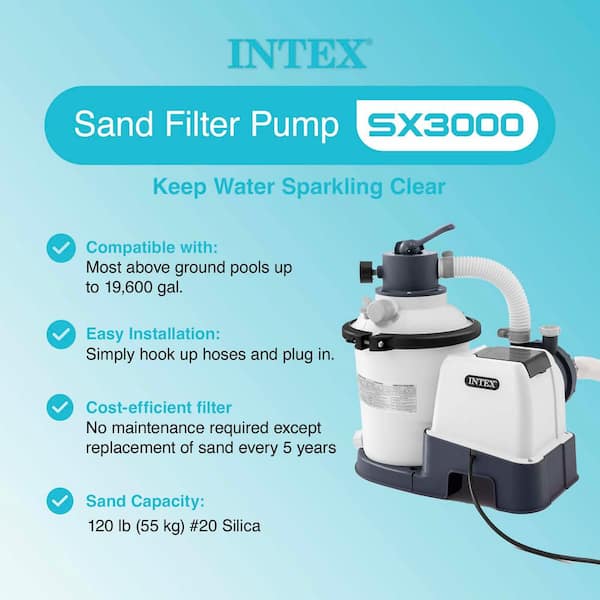
Backwashing reverses the water flow, flushing the dirt out of the sand and restoring your filter’s power. Always rinse after backwashing to settle the sand before returning to FP mode.
Credit: www.homedepot.com
How To Maintain Fp Mode For Best Results
Here’s how to keep your FP mode working at its best:
- Clean the skimmer and pump baskets weekly to avoid clogs.
- Check the pressure gauge every few days.
- Backwash when the pressure rises 8–10 psi over the normal starting point.
- Change sand every 2–3 years for most Intex filters.
- Inspect for leaks around the valve and hoses.
If you notice leaks, strange noises, or poor filtering, stop the pump and check for problems. Early attention prevents bigger repairs later.
Fp Mode Troubleshooting: What Can Go Wrong?
Even when you use FP mode correctly, issues can happen. Here’s how to troubleshoot common problems:
Low Water Flow In Fp Mode
- Check for clogs in skimmer, pump basket, or hoses
- Sand may be dirty or old—try backwashing
- Pump impeller could be blocked—inspect and clean
Cloudy Water Despite Fp Mode
- Filter runtime too short—increase daily hours
- Sand may be worn out—replace every few years
- Chemical imbalance—test and adjust chlorine, pH
Pressure Gauge Problems
- Gauge stuck on zero—could be broken, replace it
- Pressure always high—sand is dirty, needs backwash or replacement
Leaks Around Multiport Valve
- Gasket may be worn—replace valve gasket
- Valve not fully seated—turn off pump, reseat and lock valve
Address problems early for a smooth and clear pool season.
Replacing Or Upgrading Filter Sand In Fp Mode
The filter sand inside your Intex system needs replacement every 2–3 years for most pools. Old sand becomes smooth and can’t trap dirt as well. Here’s how to replace it:
- Turn off the pump and disconnect hoses.
- Open the filter tank (follow the manual).
- Scoop out old sand with a small cup or vacuum.
- Add new pool filter sand (not play sand), filling to the line marked inside.
- Close the tank, reconnect hoses, and backwash before using FP mode.
Always use only the sand type recommended by Intex. Wrong sand can clog the filter or damage equipment.
How Intex Fp Mode Differs From Other Brands
While most sand filters work the same way, there are some differences between Intex and other brands:
| Feature | Intex Sand Filter | Other Brands (e.g., Hayward, Pentair) |
|---|---|---|
| Valve Labeling | FP or Filter | Usually “Filter” |
| Valve Type | Top-mount, simple design | Top or side mount, more options |
| Sand Type | Special fine sand, listed by Intex | Standard pool filter sand |
| Maintenance | Easy, tool-free | May require tools |
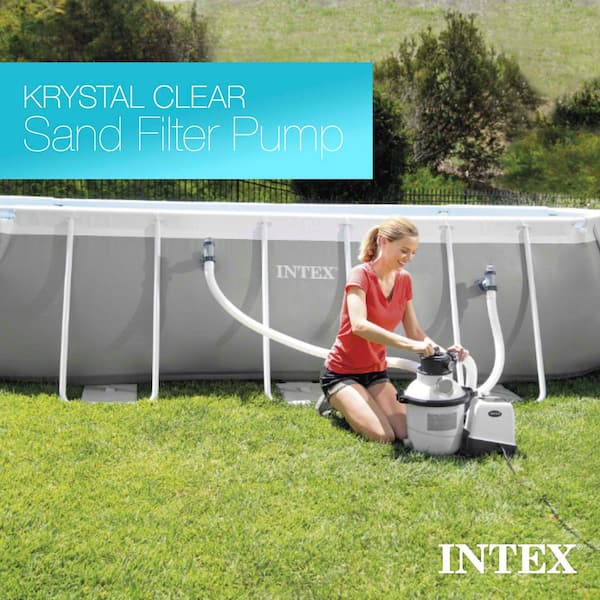
Always check your specific model’s manual for correct operation. If in doubt, the Intex support site and community forums are helpful resources.
Credit: www.homedepot.com
Is Fp Mode Energy Efficient?
Running your pool filter in FP mode can use a lot of energy, especially in hot climates or for larger pools. Here’s how to balance clean water with lower energy bills:
- Use a timer: Set your filter to run during off-peak electricity hours.
- Clean baskets regularly: A clogged system uses more power.
- Upgrade to an energy-efficient pump if possible.
- Filter during the hottest part of the day to prevent algae, but avoid running all night unless necessary.
On average, a 0.5–1.5 HP pool pump in FP mode uses about 0.75–2.0 kWh per hour. Multiply by your local electricity rate to estimate daily costs.
How Fp Mode Affects Pool Longevity
Regular use of FP mode not only keeps water clean but also extends the life of your pool and its equipment:
- Prevents build-up of algae and scale, reducing the need for harsh chemicals
- Keeps water moving, which protects liners and walls from stains
- Reduces wear on your pump by preventing clogs and overheating
Neglecting FP mode can lead to costly repairs or even the need to drain and refill your pool.
Safety Tips When Using Fp Mode
Safety is always important around pools. Here are some reminders:
- Always turn off the pump before changing valve settings.
- Keep children and pets away from the filter system when running or during maintenance.
- Make sure hoses and clamps are tight to prevent leaks or blowouts.
- If you smell burning or see smoke, turn off the system and call for help.
Do not attempt repairs on electrical parts unless you are qualified.
What To Do If Fp Mode Stops Working
If you set your filter to FP and nothing happens, try these steps:
- Check power supply: Make sure the pump is plugged in and breaker is on.
- Inspect pump and motor: Listen for sounds, check for overheating.
- Look for clogs: Hoses, baskets, or sand may be blocked.
- Review valve position: Confirm it is locked in FP, not between settings.
- Consult the manual: Some problems are specific to certain models.
If you can’t fix the issue, contact Intex customer support or a pool technician.
How Fp Mode Fits Into Seasonal Pool Care
Your use of FP mode will change with the seasons:
- Spring opening: Run FP mode 24–48 hours straight to clear winter debris.
- Summer: Run daily, adjust hours for heavy use.
- Fall closing: Run FP mode, then backwash and drain before winterizing.
- Winter: If your pool is closed, follow Intex’s instructions for storage.
Neglecting to use FP mode in spring and summer is a leading cause of green or smelly pools.
The Role Of Fp Mode In Pool Health
Clean, healthy water is not just about looks. The FP mode helps remove bacteria, viruses, and parasites that can cause illness. It’s an essential part of safe swimming, especially for children and sensitive individuals.
- Giardia and Cryptosporidium: These germs are resistant to chlorine but can be removed by filtering.
- E. coli and other bacteria: Filtered out in FP mode, reducing infection risks.
For more on pool water safety, see the CDC’s resources on healthy swimming at CDC Healthy Swimming.
Fp Mode: Real-world Example
Let’s look at a typical scenario. Maria, a new pool owner, set her Intex sand filter to FP mode for only 4 hours a day. Within a week, her pool was cloudy and smelled odd. After testing, she learned her turnover rate was too low.
By increasing FP mode to 10 hours and backwashing every 10 days, her water cleared up. She also saved money by using fewer chemicals.
Key lesson: Running FP mode for the right length of time, combined with regular maintenance, solves most water clarity problems.
Comparing Fp Mode With Cartridge And De Filters
Some pool owners wonder how Intex’s FP mode stacks up against other filter types. Here’s a brief comparison:
- Cartridge filters: No FP mode; you clean by removing and hosing off the cartridge. Easier for small pools but less powerful for larger debris.
- DE filters: Use diatomaceous earth powder. Have a similar “Filter” mode, but require adding powder after each backwash. More complex, but finer filtration.
Intex sand filter FP mode is popular because it’s simple, reliable, and easy to maintain for most above-ground pools.
Frequently Asked Questions
What Does Fp Mean On My Intex Sand Filter?
FP stands for Filter Pump or Filter Position. It is the main setting used for daily filtration of your pool water. When set to FP, the filter removes dirt, debris, and small particles from the water.
How Often Should I Run My Intex Sand Filter In Fp Mode?
You should run your filter in FP mode for 8–12 hours per day. Adjust the runtime based on your pool size, usage, and weather. More swimmers or hotter weather means longer run times.
Can I Switch To Fp Mode While The Pump Is Running?
No. Always turn off the pump before changing the valve to FP or any other setting. Switching while running can damage the valve and cause leaks.
What Should I Do If Fp Mode Isn’t Cleaning My Pool?
If FP mode isn’t effective, check for these problems: dirty or old filter sand, clogged baskets or hoses, short filter runtime, or chemical imbalance. Try backwashing and increasing filter hours.
Is Fp Mode The Same As “filter” On Other Pool Filters?
Yes, FP mode on Intex sand filters is the same as the “Filter” setting on most other pool filters. It’s used for the daily cleaning cycle to keep pool water clear.
Using your Intex sand filter’s FP mode correctly is the key to a clean, safe, and enjoyable pool. With regular maintenance, proper filter sand, and attention to the details above, you can enjoy clear water all season long. If you ever have doubts, consult your manual or reach out to pool care professionals for advice.