
Many people believe the only way to turn off a Samsung refrigerator is by unplugging it from the wall. But what if your fridge is built-in, or the power outlet is hard to reach? Or maybe you only want to switch off the cooling without cutting power to the whole unit.
Samsung refrigerators include built-in controls to power off or disable cooling, but the right method depends on your model. Let’s explore how you can safely turn off your Samsung refrigerator without unplugging, why you might need to do this, and what to watch out for.
Why Turn Off A Samsung Refrigerator Without Unplugging?
Turning off your refrigerator without unplugging may sound unnecessary, but there are practical reasons for this feature. You might need to:
- Clean your refrigerator thoroughly without worrying about electrical hazards
- Defrost the freezer section safely
- Move the fridge to a new location
- Reset or troubleshoot cooling issues
- Save energy during extended vacations
Unplugging is not always possible, especially for large or built-in models. Also, unplugging may reset all your settings or cause problems with smart features. Learning the right way to turn off your Samsung refrigerator gives you more control and helps keep your appliance in top condition.
Understanding Samsung Refrigerator Power Options
Samsung refrigerators are modern appliances with advanced controls. Most new models offer more than one way to stop cooling, and not all methods shut off the appliance completely. It’s important to know the difference between power off, cooling off, and demo mode.
Power Off Vs. Cooling Off Vs. Demo Mode
- Power Off: Stops all functions, like unplugging. Only possible on some models.
- Cooling Off: Turns off the cooling system but leaves lights and control panel active.
- Demo Mode: Used in stores. Disables cooling but keeps lights and display on.
Each method has its own steps, and not all are suitable for every purpose. For example, cooling off is best for cleaning or defrosting, while power off is better for repairs or moving the fridge.
Methods To Turn Off Your Samsung Refrigerator Without Unplugging
Let’s look at the main ways to stop your Samsung refrigerator from cooling, without pulling the plug. Steps may differ depending on your model, so always check your user manual for specific instructions.
1. Using The Control Panel
Many Samsung refrigerators have a digital control panel on the door or inside. This panel lets you adjust temperature, activate features, and sometimes turn off cooling.
Steps For Most Digital Models
- Find the Control Panel: This is usually on the front door or inside the fridge, above the top shelf.
- Locate the ‘Power Cool’ and ‘Power Freeze’ Buttons: Some models combine these functions.
- Activate Cooling Off Mode:
- Hold both buttons (Power Cool and Power Freeze) at the same time for about 5 seconds.
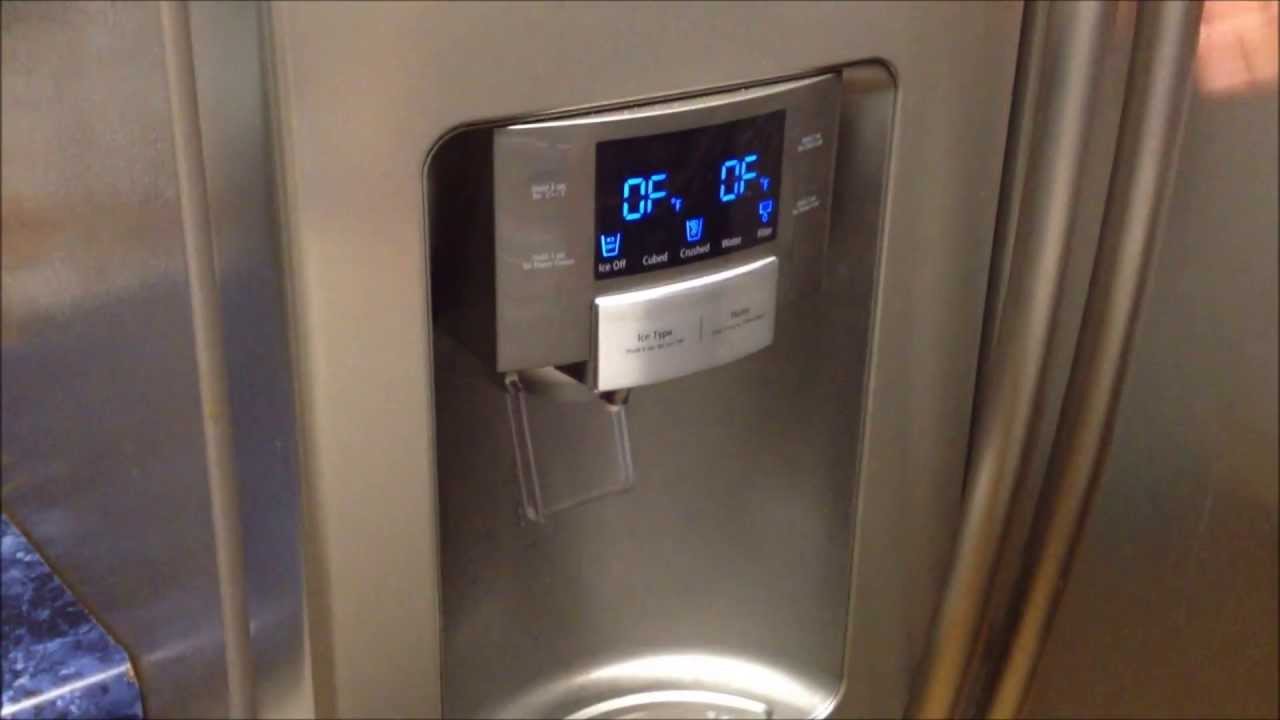
- The display may show “OFF” or “O FF” to confirm cooling is disabled.
- Check the Lights and Display: The fridge should remain powered (lights and display work), but cooling stops.
Things To Remember
- If you see “OF” or “O FF” on the display, the fridge is in cooling off mode.
- To restart cooling, repeat the steps above.
- Not all models use the same button combination.
2. Using The Power Button (if Available)
Some newer models, especially Family Hub or high-end French door models, include a specific power button.
How To Use The Power Button
- Open the Fridge Door: The button is often inside, near the top.
- Press and Hold the Power Button: Hold for 3-5 seconds.
- Wait for the Display: The control panel should go dark, or you may see “OFF”.
This method is closest to unplugging, but not all Samsung fridges have a power button.
3. Activating Demo Mode
Demo mode (also called showroom mode) is used in stores. It disables the compressor but keeps lights and controls working. Some people use demo mode to turn off cooling temporarily.
How To Enter Demo Mode
- Locate the Freezer and Fridge Buttons: Usually on the control panel.
- Press Both Buttons Together: Hold for 5-10 seconds.
- Look for “OF” or “O FF”: This confirms demo mode is active.
Important Note
- In demo mode, the fridge does not cool at all.
- Food will spoil if left inside.
- To exit demo mode, repeat the same button combination.
4. Using The Smartthings App
If you have a Wi-Fi-enabled Samsung refrigerator, you may be able to control it with the SmartThings app.
Steps For Smart Fridge Owners
- Connect Your Fridge: Follow instructions to pair the fridge with your SmartThings account.
- Open the App: Find your refrigerator device.
- Go to Settings or Functions: Look for “Cooling Off” or similar options.
- Toggle Cooling Off: The app will send the command to your fridge.
This is helpful if you’re away from home or the control panel is hard to reach.
5. Using The Circuit Breaker
If you must cut power completely (for repairs or moving), but can’t unplug, you can turn off the circuit breaker that powers the fridge.
How To Do It
- Find Your Home’s Circuit Breaker Panel.
- Locate the Breaker for the Refrigerator: Check labels or turn off breakers one at a time.
- Switch Off the Correct Breaker.
This method stops all electricity to the fridge, just like unplugging.
Comparing Methods: Which Is Best For You?
Choosing the right method depends on your goal. Here’s a comparison to help you decide:
| Method | What It Does | Best For | Risks |
|---|---|---|---|
| Control Panel (Cooling Off) | Stops cooling, keeps power | Cleaning, defrosting | Food spoilage if left too long |
| Power Button | Turns off entire unit | Moving, repairs | May reset settings |
| Demo Mode | Disables compressor, keeps display | Temporary display | Easy to forget, food spoilage |
| SmartThings App | Remote cooling control | Smart fridges, remote use | App or connection issues |
| Circuit Breaker | Cuts all power | Hard-to-reach plugs, built-ins | May affect other devices |
Tip: If you’re simply cleaning or defrosting, use cooling off or demo mode. For repairs, use the power button or circuit breaker.
How To Tell If Your Samsung Refrigerator Is Off
It’s important to confirm the fridge is actually off (or not cooling) before you begin cleaning or repairs.
Signs Your Fridge Is Off Or Cooling Is Disabled
- “OFF” or “O FF” shows on the display
- Lights are on, but fans and compressor are silent
- Temperature stays at room level
- SmartThings app says “Cooling Off”
What About Food Safety?
Never leave food inside if the cooling is off for more than two hours. Meat, dairy, and leftovers can spoil quickly.
Non-obvious Insight: Even with lights on, the inside of the fridge can warm up faster than you expect. Always move perishable items to another fridge or cooler if you plan to turn off cooling for more than an hour.
Step-by-step Guide: Cooling Off Mode For Popular Samsung Models
Samsung refrigerators come in many styles—French door, side-by-side, top freezer, and smart models. Here are step-by-step instructions for some of the most common types.
French Door Models (e.g., Rf28, Rf23 Series)
- Open the fridge doors.
- Find the control panel at the top, inside the right door.
- Press and hold the “Fridge” and “Freezer” buttons at the same time for 5 seconds.
- Display will show “OFF” or “O FF”.
- To exit, repeat the steps.
Side-by-side Models (e.g., Rs27, Rs22 Series)
- Locate the control panel on the freezer door.
- Press and hold “Power Freeze” and “Fridge” buttons together for 5-10 seconds.
- Watch for “O FF” or “OF OF” on the display.
- Repeat to turn cooling back on.
Family Hub And Smart Models
- Tap the screen to wake up the display.
- Go to Settings > Refrigerator Options.
- Select “Cooling Off” or “Demo Mode”.
- Follow on-screen instructions to confirm.
Top Freezer And Bottom Freezer Models
- Find the inside control panel (usually above the top shelf).
- Hold the “Power Cool” and “Power Freeze” buttons together for 5-10 seconds.
- Look for the “OFF” message.
Non-obvious Insight: Many Samsung fridges use similar button combinations, but not all. If your fridge does not respond, check the manual—older models may require different steps.
When You Should Not Turn Off Your Refrigerator
There are times when turning off your fridge is not a good idea, even if you can do it easily.
- If the fridge is full of food: Turning off cooling will cause spoilage.
- If you have medicines or temperature-sensitive items inside: These can become unsafe.
- If you’re only going on a short trip: It’s better to leave the fridge running.
- If you’re not sure you can turn it back on: Some smart features may need Wi-Fi or a technician.
Common Mistakes To Avoid
Many people make mistakes when trying to turn off their Samsung refrigerator. Here are common pitfalls and how to avoid them:
- Forgetting to remove food: Always empty the fridge before stopping cooling.
- Not checking the display: Make sure “OFF” or “O FF” appears so you know cooling is off.
- Confusing demo mode with cooling off mode: Demo mode is not meant for long-term use at home.
- Holding the wrong buttons: Button combinations are different on some models.
- Leaving the doors closed for too long: Stale air and odors can develop quickly.
- Not consulting the user manual: Always double-check for your specific model.
Why Not Just Unplug? The Risks And Downsides
Unplugging is simple, but it’s not always the best solution. Here’s why:
- Hard-to-reach outlets: Built-in or large fridges are often difficult to unplug.
- Possible power surges: Unplugging and plugging back in can cause surges or damage.
- Loss of settings: Unplugging may erase Wi-Fi connections or temperature settings.
- Smart features offline: Some smart fridges need constant power for updates and diagnostics.
- Breaker confusion: Turning off the wrong breaker can affect other appliances.
How To Restore Power Or Cooling
After you finish cleaning, moving, or troubleshooting, you’ll need to turn the fridge back on.
Steps To Resume Cooling
- Press the same buttons you used to turn cooling off.
- Wait for the display to return to normal.
- Listen for the compressor and fans—cooling should start in a few minutes.
- Check the temperature after one hour to make sure cooling is working.
If Your Fridge Does Not Turn Back On
- Check that the breaker or power button is on.
- Make sure the doors are closed—some models won’t start if a door is open.
- Reset the control panel by unplugging for 30 seconds, then plugging back in.
- If you used the SmartThings app, make sure your Wi-Fi is working.
If your refrigerator still does not cool, contact Samsung support or a professional technician.
Credit: www.youtube.com
Energy Saving Tips When Turning Off Your Fridge
If you plan to turn off your Samsung refrigerator for an extended time, follow these tips to save energy and prevent problems:
- Empty and clean the fridge: Remove all food and wipe down surfaces.
- Leave the doors open slightly: Prevents mold and odors.
- Place a box of baking soda inside: Absorbs moisture and smells.
- Unplug or turn off at the breaker if possible: Saves the most energy.
- If using cooling off mode, check the display regularly: Make sure it stays off.
Example: If you leave your fridge off for a month, leaving doors closed can lead to mold growth and bad smells. Always prop the doors open a little with a towel or block.
Troubleshooting: What If The Cooling Off Feature Doesn’t Work?
Sometimes, the cooling off mode or demo mode does not activate as expected. Here’s what to do:
- Double-check your button combination: Some models need 3 buttons held, or a different set.
- Check for child lock: If the control panel is locked, unlock it first.
- Restart the fridge: Unplug for 1 minute, then try again.
- Update your manual: Download the latest manual from the Samsung support site.
- Contact support: Some older models may not support these features.
Credit: asappliancerepair.net
How To Find Your Samsung Refrigerator Model Number
Knowing your exact model helps you find the right instructions. The model number is usually:
- Inside the fridge, left wall near the vegetable drawers
- On the door frame, when you open the fridge
- On the back of the unit
Write down the model number before you search for manuals or support.
Quick Reference: Button Combinations For Popular Models
Here’s a handy guide for button combinations for cooling off or demo mode.
| Model Type | Button Combination | Time to Hold | Display Message |
|---|---|---|---|
| French Door | Fridge + Freezer | 5 seconds | O FF |
| Side-by-Side | Power Freeze + Fridge | 5-10 seconds | OF OF |
| Top Freezer | Power Cool + Power Freeze | 5 seconds | O FF |
| Family Hub | Settings Menu | Follow screen | Cooling Off |
Remember: If your display does not show “O FF” or “OFF,” the cooling is likely still running.

Credit: www.reddit.com
When To Call A Professional
If you cannot turn off your Samsung refrigerator, or it does not turn back on, it’s best to contact a professional. Some advanced models have complex electronics, and forcing a shutdown may cause damage.
- If you hear unusual noises
- If the display shows error codes
- If the control panel does not respond
Contact Samsung support or a licensed repair technician. For official manuals and support, you can check the Samsung Support website.
Keeping Your Refrigerator In Top Condition
Turning off your refrigerator safely is only one part of caring for your appliance. Here are some quick maintenance tips:
- Clean the coils: Dusty coils make your fridge work harder.
- Check the door seals: Worn seals waste energy.
- Don’t overload shelves: Heavy items can break shelves or block airflow.
- Update your fridge’s software: If you have a smart model, check for updates in the app.
Frequently Asked Questions
How Long Can I Leave My Samsung Refrigerator In Cooling Off Mode?
You can leave your fridge in cooling off mode as long as you want, but it is not recommended for more than a few hours if there is food inside. For empty, cleaned fridges, longer periods are fine. Always leave the doors open if storing the fridge this way.
Will Turning Off Cooling Erase My Settings?
Usually, cooling off mode does not erase your temperature or Wi-Fi settings. However, using the power button or turning off at the breaker may reset some settings. Check your manual for your model.
What Does “o Ff” Mean On My Samsung Refrigerator?
“O FF” or “OFF” on the display means the cooling system is disabled. The fridge is not cooling, but lights and controls still work. This is normal when using cooling off or demo mode.
Can I Turn Off Just The Freezer Or Fridge Section?
On most Samsung refrigerators, cooling off mode disables both the fridge and freezer together. Some high-end models let you adjust compartments separately, but this is less common. Check your control panel or manual.
Is It Safe To Use Demo Mode At Home?
Demo mode is meant for stores, not home use. It turns off cooling but keeps the display running. It’s safe for short-term use (like cleaning), but not for storing food. Always double-check that demo mode is off before refilling the fridge.
Turning off your Samsung refrigerator without unplugging is not difficult when you know the right method for your model. Whether you’re cleaning, moving, or saving energy, using the built-in controls is safer and easier than pulling the plug. Always check your user manual, follow the right steps, and take care of your food and appliance for the best results.