
If you own a pool or spa, you know how important it is to keep your equipment safe during cold weather. The Pentair Easy Touch control system offers a smart way to protect your pool—especially with its freeze protection setting. But many pool owners are unsure how this feature works, how to set it correctly, and what details matter most. Understanding the freeze protection setting can help you avoid costly repairs and keep your pool running smoothly all year round.
This guide explains everything about the Pentair Easy Touch freeze protection setting: what it does, how it works, how to set it, and common mistakes to avoid. Whether you are a new pool owner or an experienced user, you’ll find practical advice to protect your investment and enjoy peace of mind, even when temperatures drop.
What Is Freeze Protection In Pentair Easy Touch?
The Pentair Easy Touch is a popular automation system for pools and spas. Freeze protection is one of its key features. It helps prevent pipes, pumps, and heaters from freezing when the temperature falls below a certain point.
When freeze protection is enabled, the Easy Touch system monitors the air temperature using a temperature sensor. If the sensor detects temperatures near freezing—typically below 36°F (2°C)—the system automatically turns on the pool pump and other selected devices. Running water keeps pipes from freezing, which can cause cracks, leaks, or expensive damage.
Why Is Freeze Protection Important?
Water expands as it freezes. If water inside your pool plumbing turns to ice, it can split pipes, damage pumps, and harm heaters. Repairs for freeze damage are costly and often require digging, replacing parts, and refilling your pool.
Pentair’s freeze protection setting acts as a preventive shield. It keeps water moving, so ice doesn’t form inside the pipes. This is especially critical in areas that experience sudden cold snaps or unpredictable winter weather.
How Does Pentair Easy Touch Detect Freezing Temperatures?
The Easy Touch uses a digital sensor mounted outside, often near the equipment pad. This sensor measures ambient air temperature. When the reading drops to your set threshold, the system starts the pump and any other devices you have linked to freeze protection.
Some owners mistakenly believe the system senses water temperature, but it actually measures air temperature. If your sensor is not installed properly, it may not read the true outdoor temperature, so it’s important to check its placement and calibration.
Setting Up Freeze Protection: Step-by-step
Configuring freeze protection on your Pentair Easy Touch is not difficult, but doing it correctly matters. Here’s a simple guide to help you set it up:
1. Locate The Air Temperature Sensor
Find the sensor installed near your pool equipment. Make sure it’s not blocked, covered, or placed indoors. It must read outdoor air to trigger freeze protection accurately.
2. Access The Easy Touch Panel
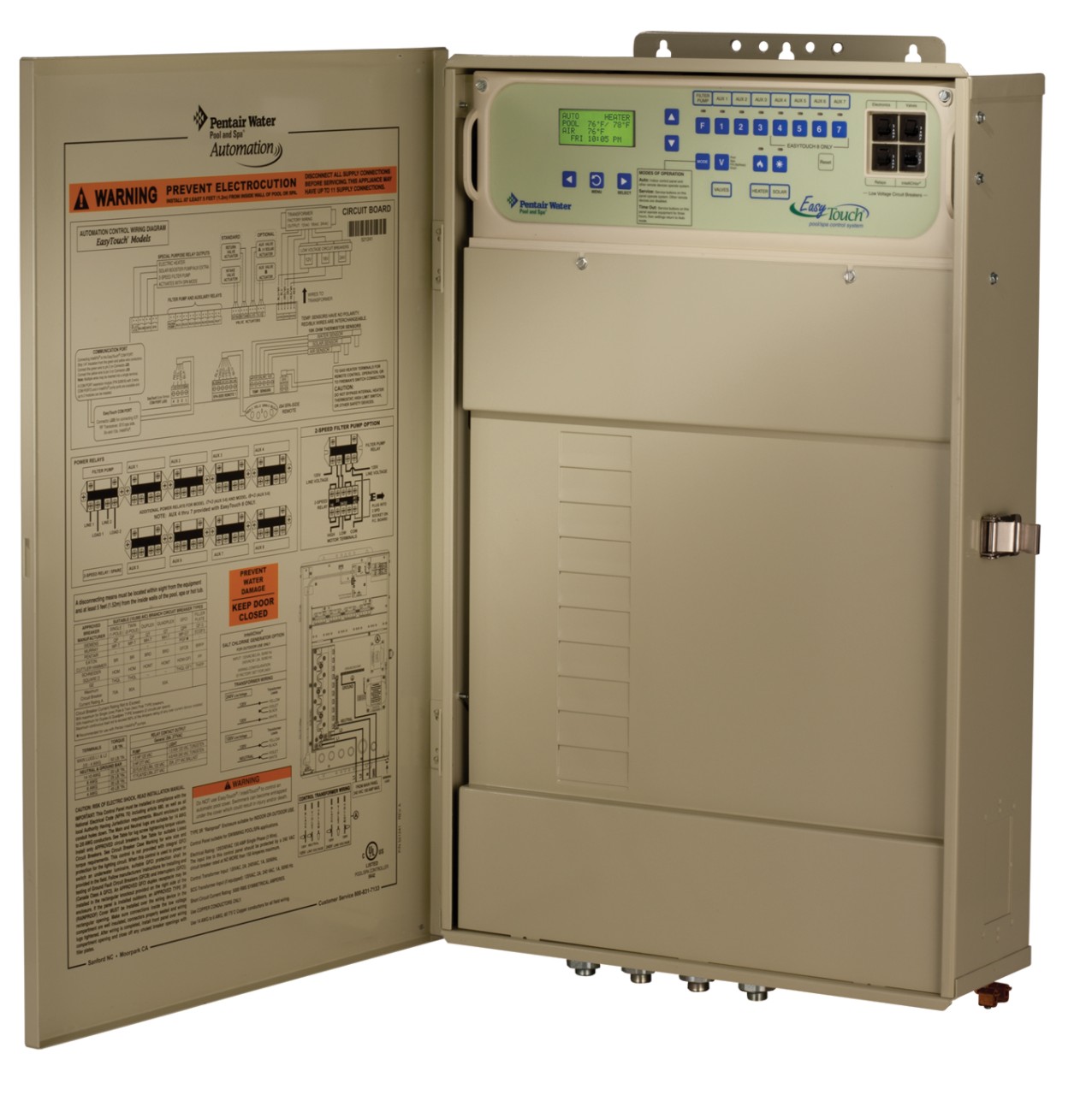
Open the panel cover. You’ll see a digital interface with buttons and a display screen.
3. Navigate To Freeze Protection Settings
Use the ‘Menu’ button to access ‘Settings’, then find ‘Freeze Protection’. Some panels label it as ‘Freeze’ or ‘Freeze Protect’.
4. Set The Activation Temperature
The default setting is usually 36°F (2°C). You can adjust this to a higher or lower temperature, depending on your climate.
- In warmer areas, you may set it to 38°F.
- In colder regions, stick to 36°F or even 34°F for extra protection.
- Choose Which Equipment to Activate
Select which pumps, valves, and heaters should turn on during freeze protection. Most pool owners activate the main pump and any attached water features.
6. Save Your Settings
Confirm your choices and exit the menu. The system will now watch for low temperatures and respond as needed.
Practical Example: Setting Freeze Protection In Dallas, Texas
Suppose you live in Dallas, where winter temperatures sometimes drop below freezing. Setting freeze protection to 36°F ensures your pump starts before ice forms. If you have a spa attached to your pool, you may want to include the spa pump in freeze protection. This setup keeps water flowing in both pool and spa lines, preventing ice-related damage.
Key Tip
Always double-check your sensor placement. If it’s in direct sunlight or near a heat source, it may not give accurate readings. A poorly placed sensor can cause freeze protection to trigger too late—or not at all.
What Equipment Does Freeze Protection Control?
Pentair Easy Touch freeze protection can activate various devices. You decide which ones are included:
- Main pool pump
- Spa pump
- Water features (like waterfalls or fountains)
- Heater (optional; usually stays off unless needed)
- Auxiliary pumps (for attached pools or spas)
- Valves (to direct water flow)
By default, the main pump is always part of freeze protection. Other devices can be added if needed. For example, if you have a waterfall with separate plumbing, you can include its pump in the freeze protection list.
Should You Include The Heater?
Many pool owners wonder if the heater should run during freeze protection. Normally, the heater stays off to save energy. However, in extremely cold climates, running the heater with the pump can provide extra safety. This is especially true if your pipes are exposed or you have older equipment.
If you choose to include the heater, make sure it’s in good working condition. Running a faulty heater during freeze protection can cause more problems.
Adjusting The Freeze Protection Temperature
The activation temperature for freeze protection is not fixed. You can set it based on your local climate and risk level.
Common Temperature Settings
- 36°F (2°C): Standard setting, suitable for most climates
- 38°F (3°C): For areas with frequent cold snaps
- 34°F (1°C): For mild climates with rare freezes
Some pool owners mistakenly set freeze protection too low, thinking it will save energy. In reality, waiting until water is near freezing increases risk. It’s better to start protection early.
Example Table: Activation Temperatures And Risks
| Activation Temperature | Risk Level | Recommended For |
|---|---|---|
| 36°F (2°C) | Low | Most climates |
| 38°F (3°C) | Very Low | Cold regions |
| 34°F (1°C) | Medium | Warm climates |
Practical Insight
Many beginners overlook the importance of early activation. Even if your area rarely freezes, sudden cold snaps can cause damage overnight. Setting freeze protection just above freezing gives your system time to react.
Common Freeze Protection Mistakes
Even with an automatic system, mistakes can happen. Here are some errors to avoid:
1. Incorrect Sensor Placement
If the sensor is inside a shed or covered, it won’t measure outdoor air. Always place it outside, away from heat sources.
2. Not Including All Water Features
If your pool has a fountain or waterfall with separate plumbing, include its pump in freeze protection. Ice can form in any water line.
3. Setting Temperature Too Low
Waiting until water is almost freezing means the system may not react in time.
4. Ignoring Maintenance
If your pump or heater is broken, freeze protection won’t help. Keep equipment in good condition, especially before winter.
5. Not Testing The System
Test freeze protection during mild weather. Make sure pumps turn on when the sensor reads low temperatures.
6. Skipping Annual Review
Review your settings each year. Your climate may change, or you may add new pool features.
Example Table: Mistakes And Solutions
| Common Mistake | Consequence | How to Fix |
|---|---|---|
| Sensor indoors | Late activation | Move sensor outside |
| Low temperature setting | Pipes freeze | Set to 36°F |
| Excluding water features | Partial freeze | Add all pumps |
| Broken pump | No protection | Repair pump |
Non-obvious Insight
Some owners forget that valves may need freeze protection. If your pool has automatic valves, include them in your freeze protection setup. Frozen valves can jam, causing water flow problems.
Energy Costs And Efficiency
Freeze protection uses electricity to run pumps during cold weather. Many pool owners worry about energy costs.
How Much Power Does Freeze Protection Use?
On average, running a pool pump uses about 1–2 kWh per hour. If freeze protection activates for 8 hours per night, that’s 8–16 kWh. In the US, this costs $1–$3 per night, depending on local rates.
Running extra pumps or heaters increases the cost. However, the price is small compared to the cost of repairing freeze damage, which can run into thousands of dollars.
Tips To Save Energy
- Use energy-efficient pumps.
- Exclude non-essential devices from freeze protection.
- Set freeze protection only for the coldest months.
- Monitor your system and adjust as needed.
Example Table: Typical Energy Costs
| Device | Power Usage (kWh/hr) | Estimated Cost ($/night) |
|---|---|---|
| Main pump | 1.5 | 2.00 |
| Heater | 3.0 | 4.00 |
| Water feature | 1.0 | 1.50 |
Energy Efficiency Insight
Most beginners don’t realize that variable-speed pumps can reduce energy use during freeze protection. If your system supports it, set pumps to run at lower speeds during cold nights. This keeps water moving but uses less electricity.
Credit: www.orchestradipugliaebasilicata.it
Troubleshooting Freeze Protection Issues
Sometimes, freeze protection doesn’t work as expected. Here’s how to troubleshoot:
1. Pump Doesn’t Start
Check if the air sensor is working. Replace if faulty. Make sure pump is included in freeze protection.
2. Pump Runs At Wrong Times
Confirm the activation temperature. If the sensor reads incorrectly, recalibrate or relocate it.
3. Water Features Don’t Activate
Make sure all pumps and valves are included in the freeze protection list.
4. System Doesn’t Save Settings
After changing settings, confirm they are saved. Some panels require you to press ‘Save’ or ‘Enter’ before exiting.
5. Sensor Reads High
If the sensor is in sunlight or near heat, it may read higher than actual air temperature. Move it to a shaded spot.
Example: Fixing A Pump That Won’t Start
Suppose your main pump doesn’t start when temperatures drop.
- First, check the freeze protection menu to ensure the pump is included.
- Inspect the sensor for damage.
- Test the pump manually to rule out mechanical issues.
- Replace the sensor or repair the pump as needed.
Advanced Settings And Customization
Pentair Easy Touch allows for advanced freeze protection setups. These are useful for complex pools or special needs.
Linking Multiple Devices
You can link multiple pumps, heaters, and valves to freeze protection. This is helpful if you have a pool and spa with separate plumbing.
Scheduling Freeze Protection
Some systems allow you to schedule freeze protection. For example, you might only activate it between midnight and 8 a. m. , when temperatures are coldest.
Remote Monitoring
If you have Pentair’s ScreenLogic interface, you can monitor and adjust freeze protection remotely using your smartphone or computer. This is handy if you travel or want to check your pool during unexpected cold snaps.
Custom Alerts
Set up alerts to notify you when freeze protection activates. This helps you catch problems early, such as a pump not starting or a sensor failure.
Pro Tip
If you have a saltwater pool, include the salt cell in your freeze protection setup. Salt cells are sensitive to freezing temperatures and can crack if water stops moving.

Credit: www.youtube.com
Real-world Examples: Pentair Easy Touch Freeze Protection Success
Many pool owners have avoided expensive repairs thanks to freeze protection. Here are some real-world stories:
- Houston, Texas: A sudden freeze caused many pools to crack. Owners with Easy Touch freeze protection avoided damage. Their pumps ran overnight, keeping water moving and pipes safe.
- Denver, Colorado: With temperatures dropping to 10°F (-12°C), freeze protection kicked in automatically. Owners reported no freeze damage, even in older pools.
- Atlanta, Georgia: Unexpected cold weather triggered freeze protection. Owners who included water features in their setup had no problems. Those who forgot to include fountains saw cracked pipes.
Non-obvious Insight
Some owners forget to check freeze protection after power outages. If your system loses power during a storm, settings may reset. Always check your Easy Touch after outages to confirm freeze protection is active.
Maintenance And Annual Review
Freeze protection works best when your equipment is well maintained. Here’s what to do before winter:
- Inspect pumps, heaters, and valves for wear.
- Clean the air sensor and check its wiring.
- Review freeze protection settings each year.
- Test the system by lowering the activation temperature and ensuring pumps start.
If you’re unsure about your setup, consult a pool professional. Annual reviews help catch problems before they cause damage.
Example Checklist
- Check air sensor placement.
- Test pumps and valves.
- Review freeze protection settings.
- Clean equipment pad.
- Confirm all water features are included.
Credit: www.pentair.com
Comparing Pentair Easy Touch To Other Freeze Protection Systems
Pentair Easy Touch is one of several pool automation systems offering freeze protection. Let’s compare it with two popular alternatives: Hayward OmniLogic and Jandy AquaLink.
| Feature | Pentair Easy Touch | Hayward OmniLogic | Jandy AquaLink |
|---|---|---|---|
| Activation Temperature Adjustable | Yes | Yes | Yes |
| Remote Monitoring | Yes (ScreenLogic) | Yes | Yes |
| Device Linking | Multiple | Multiple | Multiple |
| User-Friendly Interface | Good | Excellent | Good |
| Energy Saving Features | Variable-speed pumps | Variable-speed pumps | Variable-speed pumps |
| Annual Maintenance Reminder | No | Yes | No |
Key Takeaway
While all systems offer freeze protection, Pentair Easy Touch stands out for its customization and remote access. However, it does not include automatic annual maintenance reminders, so owners must remember to review settings each year.
Frequently Asked Questions
What Is The Default Freeze Protection Temperature On Pentair Easy Touch?
The default setting is 36°F (2°C). This means the system will start pumps and other devices when air temperature falls to this point. You can adjust the temperature if needed.
Should I Include All Pumps And Water Features In Freeze Protection?
Yes, it’s wise to include every pump or water feature with its own plumbing. Ice can form in any water line, so protecting all parts ensures your pool stays safe.
How Do I Know If Freeze Protection Is Working?
Test by setting the activation temperature higher than current air temperature. The system should turn on pumps and devices. You can also check the display for freeze protection status.
Can I Monitor Freeze Protection Remotely?
Yes, if your Pentair Easy Touch system includes the ScreenLogic interface, you can monitor and adjust settings from your phone or computer. This feature is useful for frequent travelers.
What Happens After A Power Outage?
After a power outage, check your system to make sure freeze protection is still active. Some settings may reset, especially on older panels. Always review and test your setup after an outage.
Final Thoughts
The Pentair Easy Touch freeze protection setting is a powerful tool for keeping your pool or spa safe during cold weather. By understanding how it works, setting it correctly, and avoiding common mistakes, you can prevent freeze damage and save money. Remember to review your settings each year, maintain your equipment, and include all water features. With proper setup, your pool will stay protected—even when winter surprises you. If you want more technical details, visit the official Pentair website for updated guides and support: Pentair Easy Touch Automation. Stay safe, and enjoy your pool year-round!