
The Pentair IntelliChlor salt chlorine generator is a reliable and efficient way to keep your pool water clean and sanitized. But like any piece of pool equipment, it can have issues from time to time—especially with the flow switch. If the flow switch malfunctions, your IntelliChlor may stop producing chlorine, display warning lights, or even shut down. Many pool owners get frustrated because flow issues can be tricky to diagnose. The good news is, with careful troubleshooting, you can often solve these problems yourself and avoid expensive service calls.
This guide is designed to help you understand, diagnose, and fix IntelliChlor flow switch problems. You’ll learn how the flow switch works, what causes issues, and how to restore your system to normal. Whether you’re a hands-on pool owner or a service professional, this article will give you clear steps, practical advice, and insights you won’t find in the basic manuals.
Let’s dive into the details and help you keep your pool running smoothly.
How The Pentair Intellichlor Flow Switch Works
The flow switch is a small but vital part of the IntelliChlor system. Its main job is to sense water flow inside the cell. Chlorine generation only happens when there is enough water moving through the cell. If flow is too low, the switch tells the system to stop making chlorine. This prevents damage to the cell and keeps the system safe.
Inside the switch, there is a paddle or sensor. When water flows fast enough, the paddle moves or the sensor detects the change. The system then “knows” it’s safe to operate. If the flow drops, the paddle returns, and the system shuts off chlorine production.
This process protects both your equipment and the pool water quality.
Non-obvious insight: The flow switch is not just for safety. If it fails, your pool can quickly turn cloudy because chlorine production stops—often with no other warning.
Common Symptoms Of Flow Switch Problems
Recognizing the signs of a faulty flow switch can save you hours of frustration. Here are the most common symptoms you may notice:
- “Low Salt” or “Check Flow” LED stays on: This is the most obvious sign. Even if your salt level is fine, a stuck or failed switch can trigger this warning.
- No chlorine production: The system may appear “on,” but no chlorine is being generated.
- Intermittent chlorine output: The system works, then stops, then starts again, even though the pump is running.
- Flashing lights or error codes: The IntelliChlor may flash “Flow” or other error codes on the control panel.
- Pool water turns cloudy or green: If the system fails for a few days, you’ll see water quality drop.
- No “click” sound: When turning on the pump, you should hear a faint click from the cell. No sound can mean the switch is not working.
Pro tip: Don’t ignore warning lights. Early action can prevent algae and expensive repairs.
Reasons Why Intellichlor Flow Switches Fail
Understanding the root causes of flow switch failure helps you fix problems faster and prevent them in the future. Here are the main reasons:
- Low water flow: This is the number one cause. Clogged filters, dirty pump baskets, or closed valves reduce flow.
- Calcium buildup: Over time, calcium deposits can form inside the cell and on the switch paddle. This restricts movement and confuses the sensor.
- Debris or air pockets: Leaves, bugs, or small objects can block the flow area. Air bubbles can also cause false readings.
- Worn-out switch: The flow switch is a moving part. With years of use, it can simply wear out or break.
- Electrical connection issues: Corrosion or loose wires at the cell or control box can stop the switch from sending signals.
- Improper installation: If the cell is not installed horizontally or is backward, the switch may not work right.
- Water chemistry problems: High calcium hardness, low salt, or incorrect pH can damage the cell and switch over time.
- Pump or plumbing issues: If your pump is undersized or plumbing is restricted, the flow switch won’t activate.
Hidden insight: Sometimes, replacing the flow switch is not needed. Cleaning or fixing flow issues can solve the problem.
Step-by-step Troubleshooting Guide
When your IntelliChlor shows a flow switch error, follow these steps to find and fix the issue. Don’t skip steps—many problems are simple to solve.
1. Check The Obvious First
- Is the pump running? The IntelliChlor only works when water is moving.
- Are valves open? Make sure all pool and spa valves are set for full flow.
- Is the filter clean? A dirty filter reduces flow and triggers switch errors.
- Is the pump basket clear? Remove leaves and debris from the pump strainer basket.
2. Inspect The Cell And Flow Switch
- Turn off the pump and disconnect power.
- Remove the IntelliChlor cell.
- Look inside for white calcium deposits or debris.
- Check the flow switch paddle or sensor for movement and cleanliness.
3. Clean The Cell And Flow Switch
- Use a garden hose to flush debris from the cell and switch.
- If there is calcium, soak the cell in a 4: 1 water-to-acid solution (4 parts water, 1 part muriatic acid) for 15-30 minutes.
- Do not scrape with metal tools—use a plastic brush if needed.
- Rinse thoroughly with fresh water.
4. Check For Air In The System
- Look for bubbles in the pump basket or return jets.
- Tighten pump lid and check all unions and fittings for leaks.
- A small air leak can reduce flow enough to trigger errors.
5. Test Electrical Connections
- Inspect the plug and wires at the cell and control box.
- Look for corrosion, loose pins, or damaged wires.
- Clean with contact cleaner and tighten all connections.
6. Observe The System
- Reinstall the cell.
- Start the pump and watch the IntelliChlor control panel.
- The “Flow” light should turn green within 1-2 minutes.
- Listen for the “click” as the flow switch activates.
7. Advanced Troubleshooting
If the problem continues:
- Swap the cell with a known good unit (if available) to isolate the issue.
- Use a multimeter to check continuity on the flow switch wires (see service manual for instructions).
- Call a Pentair service technician if you find a failed switch or damaged cell.
Practical example: Many pool owners find that a simple cell cleaning fixes persistent “Check Flow” errors—especially after a few years of use.
Comparing Flow Switch Issues With Other Common Pool Problems
It’s easy to confuse a flow switch problem with other pool equipment issues. Here’s a quick comparison to help you tell them apart.
| Symptom | Likely Cause | Solution |
|---|---|---|
| “Check Flow” light | Flow switch, low flow | Clean cell, check filter/pump |
| “Low Salt” light | Salt level, dirty cell | Add salt, clean cell |
| No power to cell | Electrical issue | Check breakers, wiring |
| Cloudy water | Low chlorine, pump issue | Shock pool, check system |
Non-obvious tip: If your system shows both “Low Salt” and “Check Flow,” always fix the flow issue first. Low flow can cause false salt readings.
How To Replace The Intellichlor Flow Switch
If you’ve followed all troubleshooting steps and the switch is bad, it’s time to replace it. Here’s how:
- Turn off all power to the pool system.
- Remove the cell following the manufacturer’s instructions.
- Locate the flow switch—usually attached to the cell body with a small plug or cable.
- Disconnect the old switch. Take care not to damage the cell or wires.
- Install the new switch in the same position and orientation.
- Reconnect cables and check that all seals are tight.
- Reinstall the cell, restore power, and test the system.
Pro tip: Only use genuine Pentair replacement parts. Off-brand switches may not fit or work correctly.
Credit: www.reddit.com
Preventing Flow Switch Problems
A little maintenance goes a long way in avoiding future trouble. Here’s what you should do:
- Clean the cell every 3-6 months, or as needed for your water chemistry.
- Check the filter and pump basket weekly during swim season.
- Balance pool water (especially calcium hardness) to prevent scale.
- Inspect all connections and wires during routine maintenance.
- Watch for slow changes—if the “Flow” light comes on more often, act before it becomes a major problem.
The Role Of Water Chemistry In Flow Switch Health
Good pool chemistry keeps all equipment—including the flow switch—working well. Here are the key parameters:
- Salt level: 3000–4000 ppm (check your manual for the exact range).
- Calcium hardness: 200–400 ppm to avoid scaling.
- PH: 7.2–7.6 for best chlorine production and cell life.
- Alkalinity: 80–120 ppm for stable water.
- Cyanuric acid (stabilizer): 30–50 ppm to protect chlorine.
Unbalanced water can cause deposits, corrosion, or sensor errors. Test your water weekly and adjust as needed.
Expert insight: High calcium is a silent killer for flow switches. Even if the pool looks clear, scale can build up inside the cell and block the paddle.
When To Call A Professional
Some flow switch problems are easy to fix, but others need expert help. Call a pool professional if:
- You see visible cracks or damage on the cell or switch.
- The system still shows errors after cleaning and replacing the switch.
- There are electrical issues you are not comfortable handling.
- You need help balancing tricky water chemistry.
Professional service can save you time and prevent bigger problems down the road.
Real-world Examples And Case Studies
Understanding how other pool owners solved their IntelliChlor flow switch problems can help you avoid mistakes. Here are three real-life scenarios:
Case 1: The Dirty Filter Dilemma
Sarah, a homeowner in Texas, noticed her IntelliChlor kept showing the “Check Flow” light. She cleaned the cell twice, but the warning returned. After calling a technician, she learned her sand filter was clogged. A backwash restored flow, and the error disappeared. Lesson: Always check the filter first.
Case 2: The Hidden Scale Trap
John owns a pool in Arizona, where water is hard. His flow switch failed after only two years. When he opened the cell, the paddle was stuck in a thick layer of calcium. After cleaning with acid and switching to a regular maintenance routine, the new switch lasted much longer.
Case 3: The Air Leak Mystery
A hotel pool manager in Florida faced intermittent “Check Flow” errors. After weeks of frustration, a technician found a tiny air leak at a union fitting before the pump. Fixing the leak solved the problem instantly. Sometimes, the issue is not where you expect.
Key takeaway: The most expensive fixes are often caused by simple, overlooked problems.
Comparing Intellichlor Flow Switches To Other Brands
IntelliChlor is not the only salt system with a flow switch. Here’s how it compares to other popular brands:
| Brand | Flow Switch Type | Common Issues | Maintenance |
|---|---|---|---|
| Pentair IntelliChlor | Integrated | Scale, debris, wear | Medium (clean cell) |
| Hayward AquaRite | External | Wire break, debris | Low (easy access) |
| Jandy TruClear | Integrated | Scale, sensor fail | Medium (clean cell) |
| CircuPool SJ | Internal | Sensor error, scale | Medium |
Non-obvious difference: IntelliChlor’s integrated switch can be harder to access but is less likely to get damaged than exposed models.
Mistakes To Avoid When Troubleshooting
Many pool owners make the same mistakes when dealing with IntelliChlor flow switch errors. Avoid these pitfalls:
- Ignoring warning lights: Early action can prevent bigger problems.
- Using metal tools to clean the cell: This can damage the cell or switch.
- Replacing the switch before checking flow: Most issues are caused by low flow or debris, not a bad switch.
- Not checking for air leaks: Small leaks can cause big headaches.
- Skipping regular maintenance: Neglect allows scale and debris to build up.
Pro insight: Always fix the root cause, not just the symptom. Replacing parts without solving flow or chemistry problems leads to repeat failures.
Cost Of Flow Switch Repair And Replacement
How much will it cost to fix or replace your IntelliChlor flow switch? Here’s a breakdown:
- DIY cleaning: Usually free, just your time and some acid ($10–$20).
- Flow switch part: $60–$120 for a genuine Pentair switch.
- Professional installation: $100–$200, depending on your location.
- Full cell replacement: $500–$900 if the cell is damaged beyond repair.
Budget tip: Regular cleaning and checking the filter can save hundreds of dollars over the life of your system.
Tools And Supplies You’ll Need
For most troubleshooting and maintenance, you’ll need:
- Screwdriver (to remove the cell)
- Garden hose
- Small plastic brush
- Muriatic acid (for cleaning scale)
- Multimeter (for electrical checks)
- Replacement flow switch (if needed)
- Protective gloves and goggles
Always follow safety guidelines when working with electricity and chemicals.
How To Tell If It’s The Flow Switch Or The Cell
Sometimes, it’s hard to know if the problem is the flow switch or the entire salt cell. Here’s how to tell:
- If the cell is clean and you still get “Check Flow,” suspect the switch.
- If you see cracks, leaks, or heavy scale that can’t be removed, the cell may be bad.
- If both the “Power” and “Flow” lights are off, check power supply and connections first.
- Swap the cell with another (if available) to isolate the problem.
Caution: Don’t assume the most expensive part is always at fault. Most problems are flow or connection related.
Signs You Need A New Flow Switch
Even with good maintenance, flow switches eventually wear out. Here are signs it’s time to replace:
- “Check Flow” light stays on even with strong flow and a clean cell
- Visible damage or corrosion on the switch
- Intermittent operation, even after cleaning
- No “click” sound when pump starts
- Switch fails continuity test with a multimeter
Replace with a genuine part for best results.

Credit: www.youtube.com
How To Prolong The Life Of Your Intellichlor Flow Switch
To get the most from your investment:
- Clean the cell and switch regularly
- Check water balance every week
- Inspect for leaks and loose connections
- Use the system only during swim season if possible
- Store spare parts in a dry, cool place
Long-term tip: Run the pump at higher speed for a few minutes after adding chemicals to prevent deposits near the switch.
Helpful Resources And Where To Get More Help
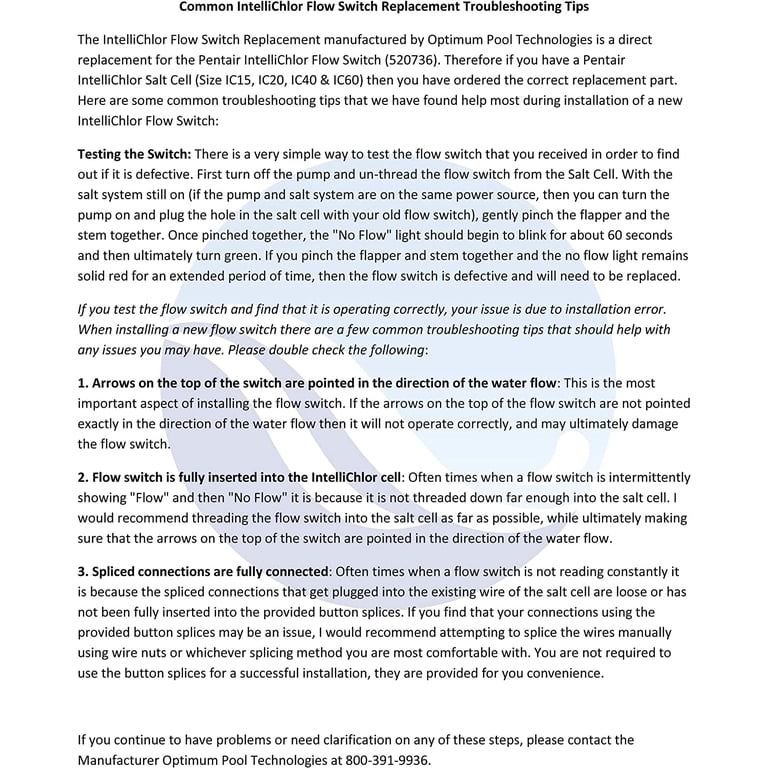
For more detailed service instructions, diagrams, and troubleshooting tips, check the official Pentair website or contact their support line. Many pool professionals also offer video guides and service calls. For technical details and replacement parts, visit Pentair’s IntelliChlor page.
Credit: www.walmart.com
Frequently Asked Questions
Why Does The Intellichlor Keep Showing “check Flow” Even After Cleaning The Cell?
This usually means there is still not enough water flow, or the flow switch is stuck or faulty. Check the filter, pump basket, and all valves. If everything is clean and open, the switch may need to be replaced.
Can I Bypass The Flow Switch To Keep The System Running?
No, bypassing the flow switch is not safe. The switch protects your cell from damage and prevents unsafe chlorine levels. Always repair or replace the switch instead of bypassing it.
How Often Should I Clean My Intellichlor Cell And Flow Switch?
Clean the cell and flow switch every 3–6 months, or more often if you have hard water. In high-use pools, monthly cleaning may be needed to prevent scale and debris buildup.
What Is The Typical Lifespan Of A Pentair Intellichlor Flow Switch?
With good maintenance, a flow switch can last 3–5 years. Hard water, poor water balance, or lack of cleaning can shorten its life. Always use genuine Pentair parts for replacements.
Is The Intellichlor Flow Switch Covered Under Warranty?
The flow switch is usually covered under the IntelliChlor system warranty, but coverage varies by model and region. Check your Pentair documentation or contact your dealer for details.
Keeping your Pentair IntelliChlor system in top shape doesn’t need to be difficult. With the right troubleshooting steps and regular maintenance, you can solve most flow switch problems yourself and enjoy clear, safe pool water all season long.