
Keeping your swimming pool warm and inviting is a top priority for many pool owners, especially when the weather turns cool. The Raypak pool heater is a trusted choice for reliable pool heating, but sometimes, users face technical issues that interrupt their enjoyment. One such message that can appear on the Raypak heater display is “Rollout SW Open”—a warning that often leaves pool owners puzzled and frustrated. Understanding what this message means, why it happens, and how to address it safely is crucial for both your pool’s comfort and your equipment’s lifespan.
This guide explores everything you need to know about the Raypak pool heater rollout switch open message. Whether you’re a seasoned pool owner, a new user, or a technician looking to sharpen your knowledge, you’ll find clear explanations, practical troubleshooting steps, and expert tips.
We’ll also discuss what the rollout switch does, how it protects your heater, and what to do if the problem persists. By the end, you’ll feel confident handling this issue and keeping your pool heater running smoothly.
What Is The Rollout Switch On A Raypak Pool Heater?
A rollout switch is a small but vital safety device inside your Raypak pool heater. Its main job is to detect unusual or dangerous heat buildup in the burner area. If hot gases escape from their proper path—rolling out instead of going up the vent—the rollout switch senses the heat and shuts down the heater. This prevents fires, damage, or even explosions.
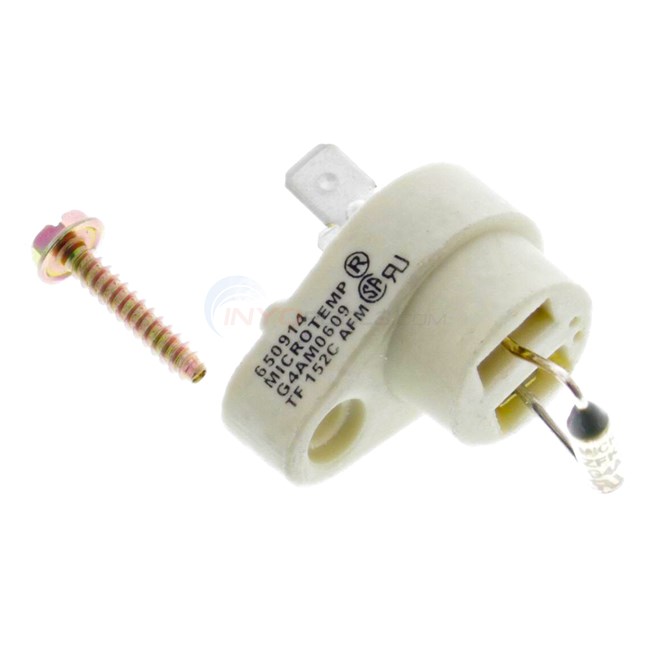
Typically, the rollout switch is a disc-shaped component mounted near the burner. It is designed to “open” (break the electrical circuit) when temperatures rise above a safe level. When this happens, the heater stops working, and you’ll see the “Rollout SW Open” message on your display.
Why Is The Rollout Switch Important?
The rollout switch is a critical safety feature. Without it, a blocked or malfunctioning heater could allow dangerous heat or flames to escape, damaging the unit or even causing a fire. By shutting down the system when things go wrong, the rollout switch keeps you, your pool, and your property safe.
What Does “rollout Sw Open” Mean On Your Raypak Pool Heater?
When your Raypak heater shows “Rollout SW Open”, it means the rollout switch has been triggered. This safety shutdown indicates that the heater detected abnormal heat near the burners. The heater will not restart until the problem is fixed and the switch is reset (either manually or automatically, depending on the model).
This message is not just a minor warning—it signals a potentially serious problem. You should never ignore or bypass the rollout switch, as it’s reacting to a real safety hazard.
Common Causes Of “rollout Sw Open”
Several issues can trigger this message:
- Blocked or dirty heat exchanger: Debris, soot, or corrosion can block the path of hot gases, causing them to escape into the cabinet.
- Obstructed vent or flue: If the vent is clogged (with leaves, nests, or soot), gases can’t escape, building up dangerous heat inside.
- Faulty or misaligned burners: If burners are not working correctly, they can produce flames that “roll out” instead of going upward.
- Broken or malfunctioning rollout switch: Sometimes, the switch itself can fail.
- Improper installation: Poor venting or installation errors can lead to heat buildup.
Often, there’s more than one issue at play. Proper diagnosis is the key to a safe solution.
How The Raypak Rollout Switch Works
To understand how the rollout switch functions, imagine it as a thermal watchdog. It is always monitoring the temperature inside the burner compartment. Under normal operation, the burner’s flame and hot gases stay contained and move safely up the vent. If something blocks the path or causes a flame rollout, intense heat quickly reaches the rollout switch.
The switch contains a temperature-sensitive disc. When exposed to high heat, the disc bends and breaks the circuit. This instantly cuts power to the gas valve, stopping the heater. The “Rollout SW Open” message appears as an alert to the user.
Automatic Vs. Manual Reset
Most modern Raypak heaters use a manual-reset rollout switch. This means that after the switch trips, you must physically press a reset button (after correcting the problem). This adds a layer of safety, making sure the issue is addressed before restarting.
Some older models may have an automatic-reset switch that resets itself after cooling down. However, these are less common and considered less safe.
Signs And Symptoms Of Rollout Switch Problems
Recognizing the symptoms early can help you avoid major damage. Here are the most common signs that you may have a rollout switch issue:
- Heater won’t ignite or stay on: The heater may start, but then shuts off quickly, or doesn’t start at all.
- “Rollout SW Open” error on display: This is the clearest sign. Some models may show different codes, such as “RLSW.”
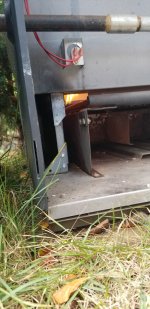
- Burn marks or discoloration: Check the front panel near the burners. Any signs of heat damage or melted parts indicate a rollout event.
- Unusual smells: A strong, burnt odor when the heater tries to run suggests improper combustion.
- Soot or debris inside the heater: Soot buildup often points to blocked vents or burners.
If you notice these warning signs, do not continue trying to operate the heater. Proceed to troubleshooting or call a professional.
Troubleshooting “rollout Sw Open” On Raypak Pool Heaters
Fixing a rollout switch open error requires a systematic approach. Follow these steps to diagnose and address the issue safely. If you’re not comfortable working with gas appliances, it’s always best to call a certified technician.
1. Turn Off The Heater And Power
Before inspecting or working on your heater, turn off all power (electricity and gas). This prevents accidents and protects both you and your equipment.
2. Check For Blockages
Open the heater cabinet and look for signs of blockages:
- Examine the heat exchanger for soot, leaves, or dirt.
- Inspect the vent/flue for obstructions. Birds, rodents, or debris can sometimes block the vent pipe.
- Look at the burner tray for any foreign objects or excessive rust.
If you find blockages, carefully clean them out. Use a soft brush and vacuum for soot or debris. Do not use water, as it can damage electrical parts.
3. Inspect The Rollout Switch
Locate the rollout switch (usually near the burner area, often with a red or black reset button). Check for:
- Physical damage: Cracked or melted plastic means the switch has been exposed to very high heat.
- Loose wires: Make sure the connections are tight and not corroded.
- Reset the switch: If it’s a manual reset, press the button. If it clicks, the switch had tripped. If it doesn’t reset, the switch may be faulty.
4. Examine Burners For Issues
Check each burner for:
- Clogged ports: Dirt, spider webs, or rust can block the gas flow.
- Misaligned burners: Burners should sit straight and properly in their holders.
Clean burners with a wire brush if needed. Never poke anything into the ports that could damage them.
5. Inspect For Soot Or Discoloration
Heavy soot or black marks inside the heater are signs of poor combustion. This can be caused by a blocked heat exchanger, incorrect gas pressure, or burner problems. If you see these signs, deeper cleaning or adjustments may be needed.
6. Check Venting And Airflow
Ensure that the vent pipe is clear all the way to its exit. Also, check that the heater room or area is well ventilated. Poor airflow can cause rollouts by starving the burner of oxygen.
7. Test The Rollout Switch
If you have a multimeter and basic electrical skills, you can test the rollout switch for continuity. With the power off, disconnect one wire from the switch and set your meter to the continuity or resistance setting. A good switch should show continuity (close to zero resistance).
If it’s open (infinite resistance) and won’t reset, the switch is bad and needs replacement.
8. Replace Faulty Parts
If you’ve identified a faulty rollout switch, damaged wires, or broken components, replace them with genuine Raypak parts. Using non-OEM parts can compromise safety and void your warranty.
9. Restart The Heater
Once you’ve fixed the problem and reassembled the heater, turn the power and gas back on. Set the thermostat and watch the heater start up. The “Rollout SW Open” message should clear. If it returns, stop and seek professional help.
10. Call A Qualified Technician
If you can’t find the cause, or if the error returns after resetting, call a licensed pool heater technician. Rollout issues can sometimes involve complex problems like vent design, gas supply, or heat exchanger failure that require expert tools and knowledge.
Common Mistakes To Avoid
Many pool owners try to bypass the rollout switch or reset it without fixing the underlying problem. This is extremely dangerous and can result in fire or severe equipment damage.
Other common mistakes include:
- Ignoring soot or burn marks
- Using incorrect replacement parts
- Failing to check for proper venting
- Restarting the heater repeatedly without inspection
Always remember: the rollout switch is protecting you. Never bypass or ignore its warning.
Maintenance Tips To Prevent Rollout Switch Problems
Proper care and regular maintenance are the best ways to avoid rollout switch issues. Here’s how to keep your Raypak pool heater in top shape:
- Annual professional inspection: Have a certified technician service your heater every year before swimming season. They’ll check burners, vents, switches, and more.
- Keep the area clear: Don’t store pool chemicals, leaves, or debris near the heater.
- Check vents regularly: Make sure birds, rodents, or insects haven’t blocked the vent or air intakes.
- Clean the heat exchanger: Soot buildup is a common cause of rollout. Clean the heat exchanger every season.
- Test the rollout switch: During annual maintenance, ask your tech to check the switch for proper function.
- Look for warning signs: Soot, unusual smells, or burn marks are all reasons to investigate further.
Following these steps will help you avoid most rollout switch problems.
How To Replace A Raypak Rollout Switch
If your rollout switch is faulty and won’t reset, you’ll need to replace it. Here’s a step-by-step overview:
- Turn off all power and gas to the heater.
- Remove the access panel to reach the burner area.
- Locate the rollout switch (usually a small round or rectangular device with two wires).
- Disconnect the wires (note which goes where).
- Remove the mounting screws and take out the old switch.
- Install the new switch in the same position.
- Reconnect the wires securely.
- Replace the access panel.
- Turn on power and gas, then test the heater.
Always use a genuine Raypak replacement switch. Check your model’s manual for the exact part number.

Credit: www.youtube.com
Cost Of Fixing A Rollout Switch Open Issue
Costs can vary depending on what’s causing the rollout switch open message. Here’s a general breakdown:
- Simple reset and cleaning: If it’s just debris or a minor blockage, expect $0 to $100 (if you do it yourself, or pay for a quick service call).
- Rollout switch replacement: The part itself is usually $20–$50, plus 1–2 hours of labor if you hire a pro.
- Major repairs (heat exchanger, venting, or burner work): Costs can rise to $200–$600 or more if parts need replacement or in-depth cleaning.
Preventive maintenance is always cheaper than emergency repairs.
Comparing Raypak Rollout Switches To Other Brands
How does the Raypak rollout switch system compare to those in other pool heaters? Here’s a comparison of common features among leading brands:
| Brand | Rollout Switch Type | Reset Method | Location | Average Cost |
|---|---|---|---|---|
| Raypak | Thermal disc | Manual | Near burners | $20–$50 |
| Hayward | Thermal disc | Manual/Auto | Near burners | $25–$55 |
| Pentair | Thermal disc | Manual | Near burners | $30–$60 |
| Sta-Rite | Thermal disc | Manual | Near burners | $25–$60 |
Raypak’s rollout switches are similar in design to other leading brands, but always check for compatibility and use OEM parts for safety.
Credit: www.inyopools.com
Real-life Examples: Rollout Switch Open In Action
To make this clearer, let’s look at a few examples:
Case 1: A pool owner notices the “Rollout SW Open” error after a heavy rainstorm. Upon inspection, they find that leaves have blocked the heater’s vent. Clearing the leaves and resetting the switch solves the problem.
Case 2: Another user sees the rollout error repeatedly after startup. A technician finds a cracked heat exchanger causing hot gases to escape into the cabinet. Replacing the heat exchanger fixes the issue.
Case 3: A heater in a pool house with poor ventilation trips the rollout switch every few days. Improving airflow in the room prevents further problems.
Non-obvious insight: Sometimes, rollout switch problems are linked to wider ventilation issues in the pool area, not just inside the heater itself. Regularly check the whole system, not just the heater.
Safety Risks Of Ignoring Rollout Switch Alerts
Disregarding a rollout switch open warning can have serious consequences:
- Fire risk: Hot gases or flames escaping the heater can ignite nearby materials.
- Carbon monoxide poisoning: Blocked vents can cause dangerous gases to build up in enclosed spaces.
- Permanent heater damage: Overheating can warp or crack the heat exchanger, leading to costly repairs.
Never ignore or bypass the rollout switch. It’s there to protect your family and investment.
How To Identify And Source The Correct Rollout Switch
Every Raypak heater model may use a slightly different rollout switch. Always check your unit’s data tag (usually inside the service door) for the model and serial number. Use this information to order the right part from a reputable dealer or directly from Raypak.
Here’s a quick comparison of common Raypak rollout switch part numbers:
| Heater Model Series | Rollout Switch Part Number | Reset Type |
|---|---|---|
| P-R206A, P-R266A | 006739F | Manual |
| P-R336A, P-R406A | 006739F | Manual |
| P-M206A, P-M406A | 006739F | Manual |
| Legacy Series | 005899F | Manual |
Before buying, double-check that the part number matches your heater. Using the wrong switch can lead to unreliable operation or safety hazards.
How To Read And Clear Error Codes On Raypak Pool Heaters
Raypak heaters display error codes on a digital control panel. The “Rollout SW Open” code is one of several safety alerts. To clear the error:
- Fix the root problem (such as cleaning or replacing the switch).
- Reset the rollout switch by pressing its button (if manual).
- Power cycle the heater: Turn power off, wait 10 seconds, then turn on again.
If the error returns, do not keep trying to reset. Seek professional service.
Non-obvious insight: Repeated rollout switch trips are usually a symptom, not the main problem. Focus on venting, combustion, and airflow—not just the switch itself.
When To Repair Vs. Replace Your Pool Heater
If your Raypak pool heater is older and has had multiple rollout switch failures, you may wonder if it’s time to replace the whole unit. Consider these factors:
- Age of heater: If it’s over 10–15 years old, parts can be harder to find, and efficiency may be low.
- Frequency of problems: Constant rollout switch issues may suggest deeper problems (cracked heat exchanger, poor venting).
- Repair costs: If repairs approach 50% of the cost of a new heater, replacement is often smarter.
A new heater will be more efficient, safer, and easier to maintain. However, many rollout switch issues can be repaired for far less than full replacement.
Professional Vs. Diy: Which Is Right For Rollout Switch Issues?
Some pool owners are comfortable with basic troubleshooting and part replacement. However, because rollout switch problems can involve gas and fire risks, it’s wise to hire a licensed technician for anything beyond simple cleaning or switch replacement.
A professional will:
- Check gas pressure and burner alignment
- Inspect venting and airflow
- Test all safety controls
- Ensure proper reassembly
DIY is fine for cleaning vents or replacing an obvious faulty switch, but don’t take risks with gas or electrical systems if you’re unsure.
Credit: www.troublefreepool.com
Where To Find Reliable Information And Parts
For official information, always refer to your Raypak heater manual or visit the manufacturer’s website. For high-quality replacement parts, use authorized dealers or well-known pool supply stores. One trusted resource for pool heater parts and troubleshooting is the Raypak official site.
Avoid buying parts from unknown online sellers, as counterfeit or incompatible switches are common.
Frequently Asked Questions
What Does The “rollout Sw Open” Message Mean?
This message means the rollout switch has detected dangerous heat or flames escaping inside the heater. It’s a safety shutdown to prevent fire or damage. The heater will not run until the problem is fixed and the switch is reset.
Can I Reset The Rollout Switch Myself?
Yes, if your heater has a manual-reset rollout switch, you can press the button to reset it. However, only do this after fixing the root cause of the problem. Never keep resetting without finding and fixing the issue.
Is It Safe To Bypass The Rollout Switch?
No, never bypass the rollout switch. It protects your heater and property from fire and other hazards. Bypassing can result in severe damage or injury, and will void your warranty.
How Often Should I Check Or Replace The Rollout Switch?
Check the rollout switch at least once a year during regular heater maintenance. Replace it only if it fails or will not reset. Frequent trips may mean you have a deeper problem with combustion or venting.
Why Does My Rollout Switch Keep Tripping?
Repeated rollout switch trips usually mean there is a blockage, poor venting, or burner problem. Common causes are dirty heat exchangers, blocked vents, or misaligned burners. Fix the root problem, not just the switch.
Keeping your Raypak pool heater safe and reliable is easy with the right knowledge. The rollout switch plays a silent but crucial role in protecting your pool, equipment, and family. Treat every “Rollout SW Open” message seriously, follow good maintenance practices, and don’t hesitate to call an expert when needed. This way, you’ll enjoy warm water and peace of mind for many seasons to come.